Image model from ByteDance Seed

Seedream 5.0 Pro AI Image Generator

Visuals that have to explain something, not merely decorate, are where the Seedream 5.0 Pro AI image generator shines. Begin with words, or with as many as five reference pictures, and get information-rich graphics, multilingual campaign art, true-to-life photography and guided edits.

  • Prompt or reference workflows
  • Output at 1K or 2K
  • Failed renders refunded
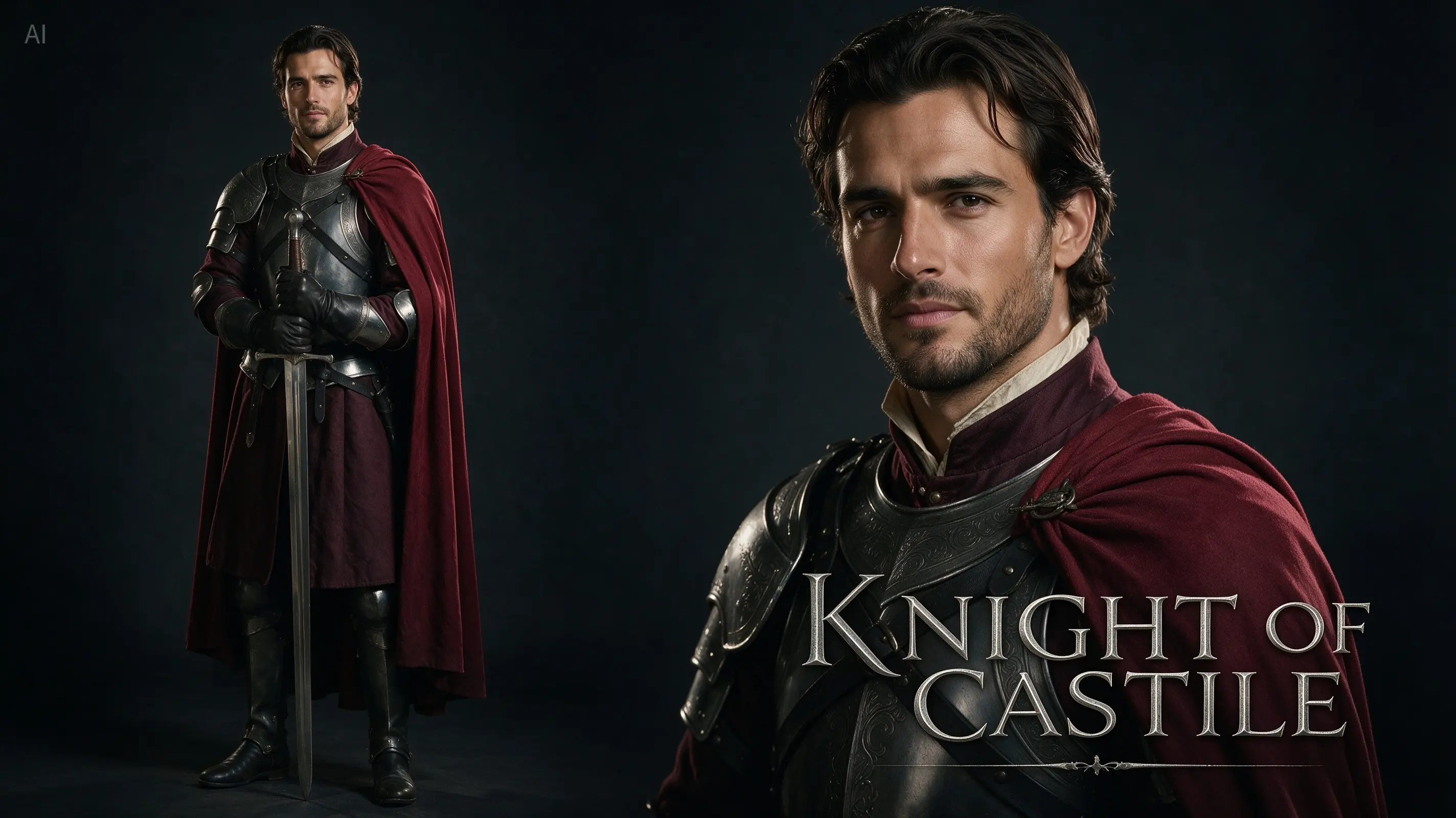
Official Seedream 5.0 Pro film poster starring a medieval knight

Generate with Seedream 5.0 Pro

Brief the model fully, set the ratio and resolution, and add reference images whenever the output has to match a subject, product or arrangement you already have.

Loading the generator…

Seedream 5.0 Pro is preselected. The model switcher is still there if you want to run the same prompt on a different image model.

An image model with a feel for design structure

Requests involving hierarchy, how elements relate, text, composition or a pinpoint change to an existing picture are where Seedream 5.0 Pro is at its most distinctive.

ByteDance pitches Seedream 5.0 Pro at professional production, as a multimodal model for creating images. Its launch singled out four areas — turning complex information into visuals, precise interactive editing, photographic quality and native multilingual output. Put together, that suits briefs that read like a real design assignment rather than a quick ask for an attractive image.

Learn More

We kept MuseGen's version leaner than the full showcase ByteDance demonstrated. Type a prompt, or attach up to five pictures and describe the role each should play. You will not find point selection, lasso masks or separate editable layers in this version, so the page covers only what you can use here: creating from prompts, generating from references, seven frame shapes and output at 1K or 2K.

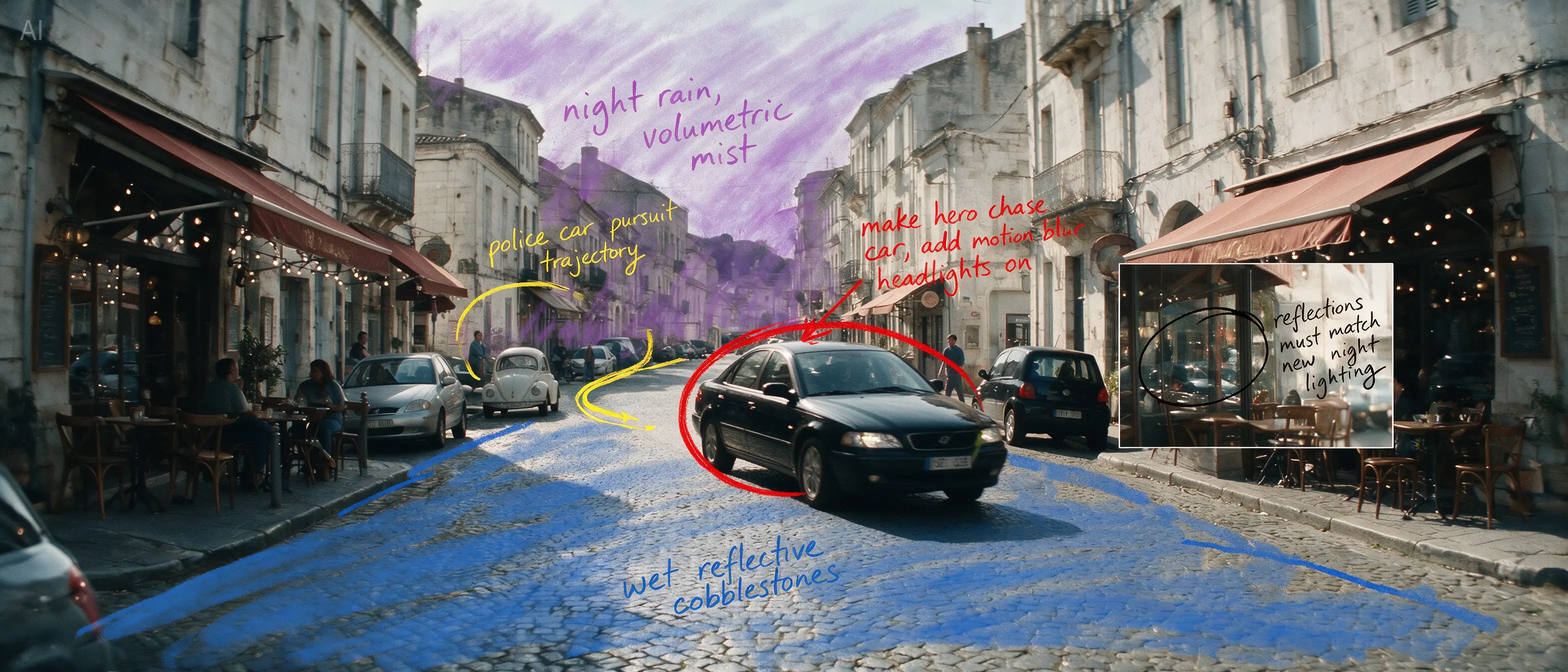
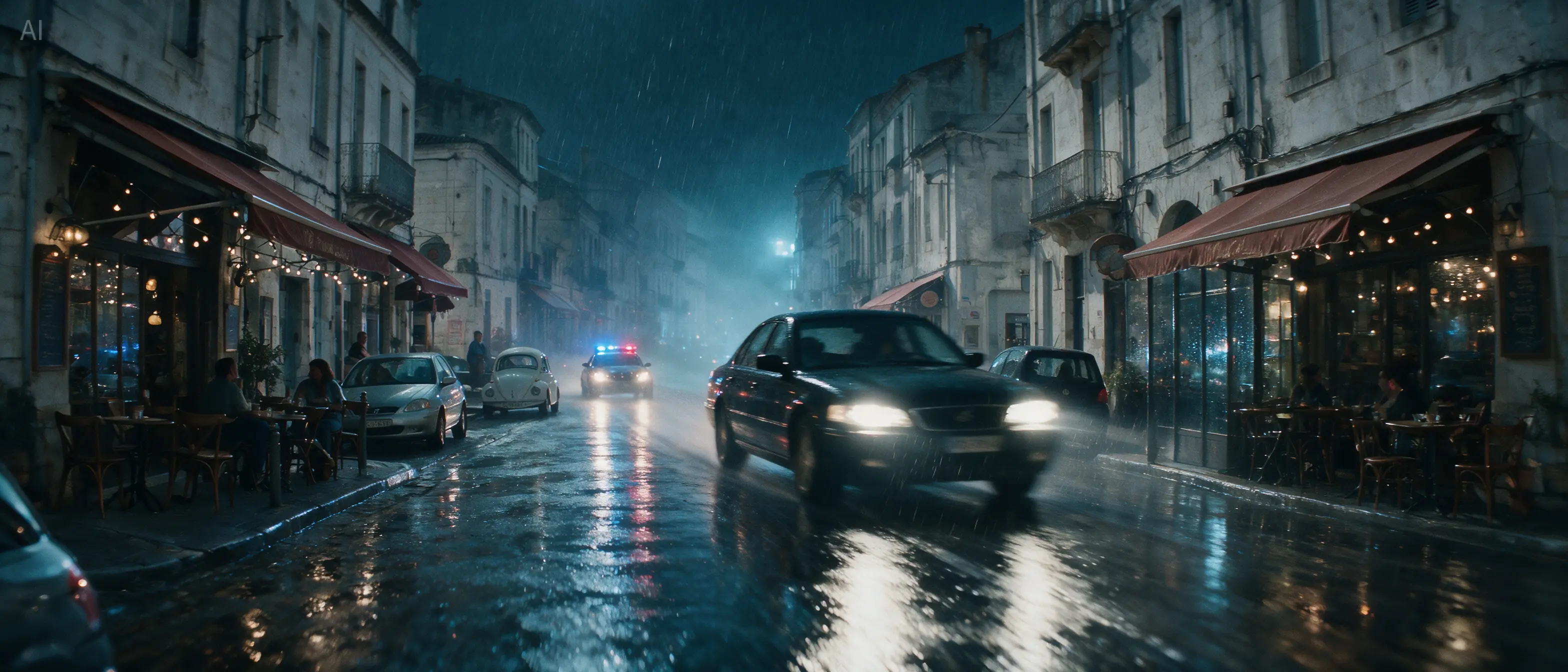
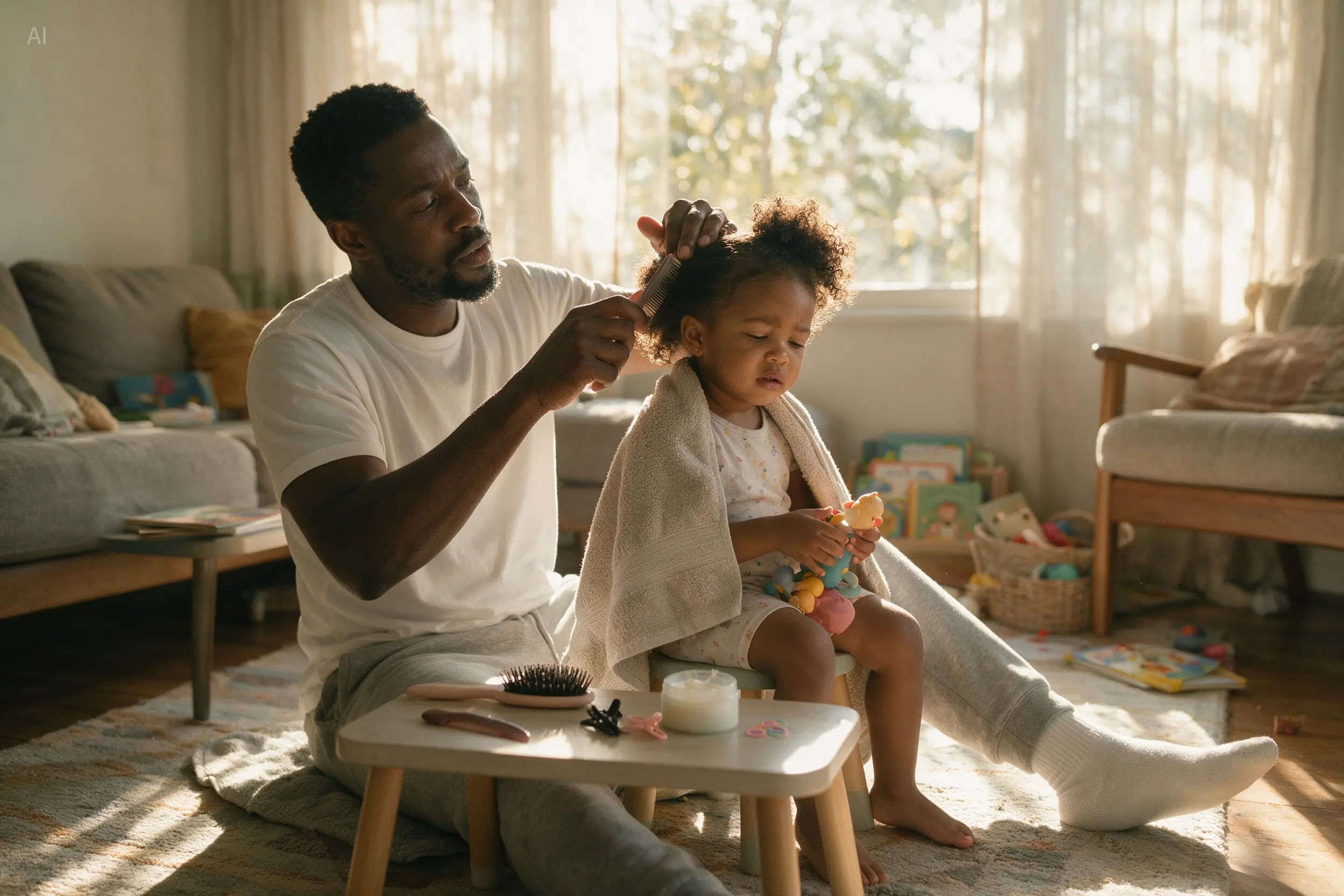
Every official example below backs up a separate claim. A technical drawing of a car demonstrates dense structure; a public-safety poster mixes several languages on one sheet; a portrait of a father and daughter shows true light and skin texture; and a street makeover shows an annotated reference plus a detailed instruction transforming a whole scene without moving its geometry.

How Seedream 5.0 Pro is set up on MuseGen

Below is what the built-in generator lets you control on MuseGen today — useful for choosing a sensible starting point before any credits are spent.

Input
Text plus 5 images at most

Words alone are enough; visual references help when you want to guide an edit, a composition or a style.

Resolution
1K or 2K

Explore at 1K, then switch to 2K when lettering, fine structure or the final placement needs extra detail.

Aspect ratios
7 shapes

Square, tall, wide and phone-first frames are all in the model settings.

Credit cost
4 or 7 credits

You see the total before generating: 4 credits for 1K, 7 credits for 2K.

Four visual jobs Seedream does particularly well

Next to each ability is an official Seedream 5.0 Pro image demonstrating that exact behaviour.

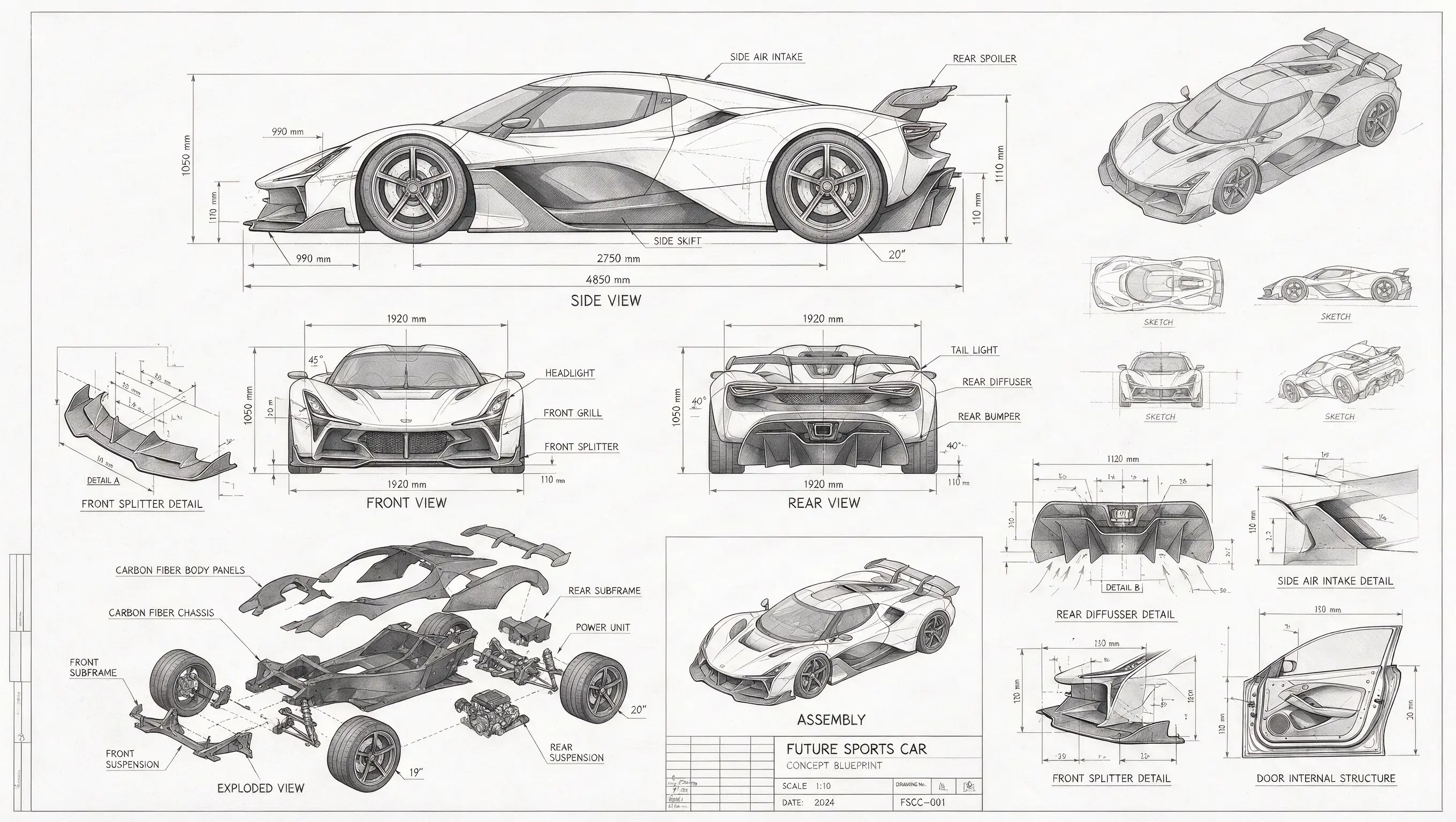
Official Seedream 5.0 Pro sports car blueprint with several projected views

Graphics dense with information

Fit a subject full of labels, links and viewpoints into a single tidy composition. Seedream's blueprint of a sports car brings together projection drawings, a parts explosion, measurements and notes on materials, yet still reads like a proper technical sheet.

Start with Seedream 5.0 Pro
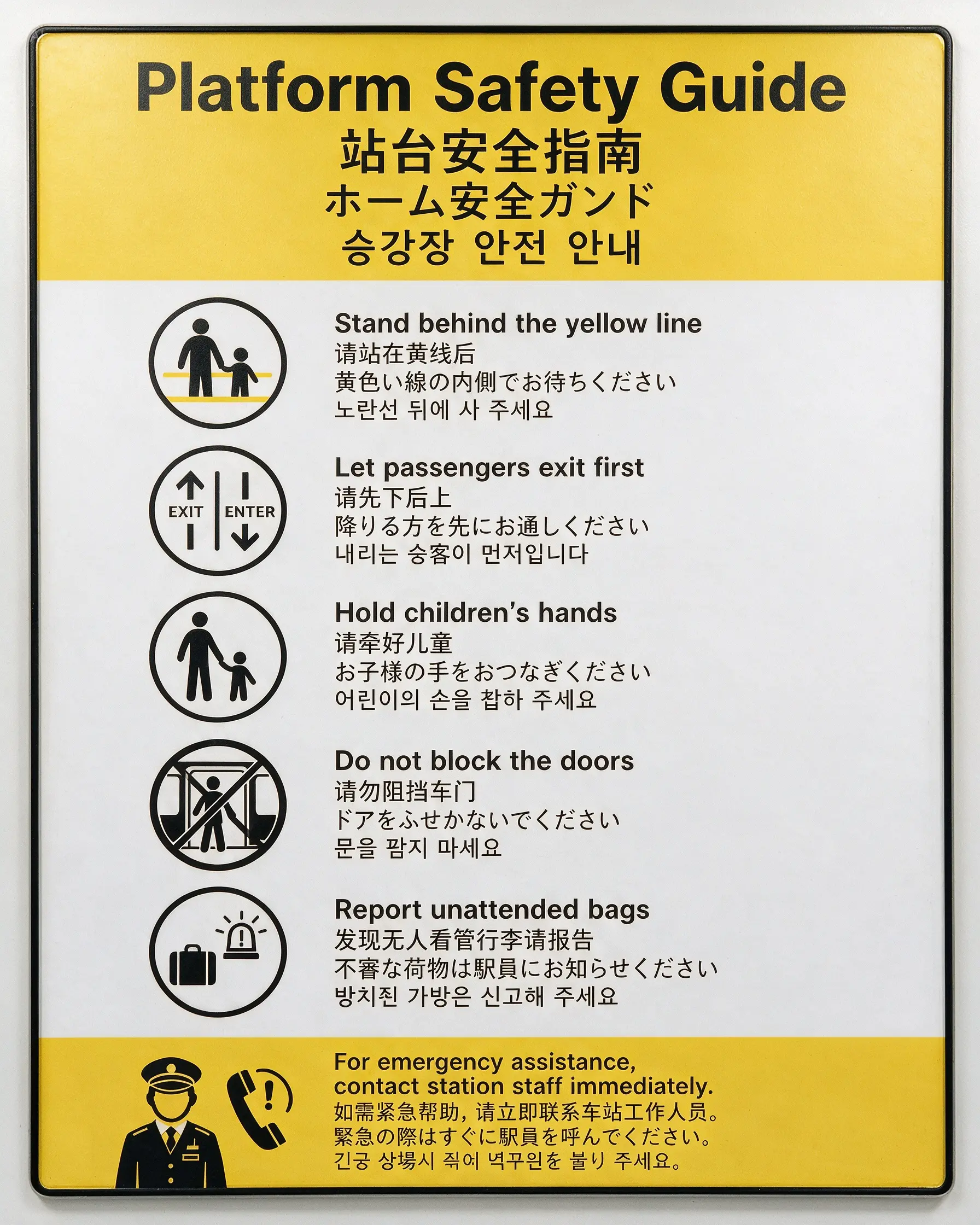
Official Seedream 5.0 Pro transit safety poster written in four languages

Text in several languages

Decide which languages appear in a poster, where each block of text sits and in what order it is read. The safety notice sets four scripts — English, Chinese, Japanese, Korean — around one transit-style sign system, a handy template for localised campaigns and public notices.

Start with Seedream 5.0 Pro
Official Seedream 5.0 Pro lifelike photo of a father doing his daughter's hair

Real light and skin texture

Describe a candid moment, where the window light comes from and the materials in the room. The father-and-daughter shot is persuasive precisely because it depends on relaxed posture, real hair texture, visible skin detail and gentle bounced light instead of drama.

Start with Seedream 5.0 Pro
Official Seedream 5.0 Pro software landing page drawn up from a rough wireframe

Production that respects layout

Ask for a finished campaign or app composition complete with headline, menu, product hierarchy and a clear call to action. Seedream's SaaS hero takes a rough pen wireframe and resolves it into a polished visual direction.

Start with Seedream 5.0 Pro

Let a reference steer the entire scene

Working from a reference pays off when your picture already frames the shot correctly or places the subjects well. Upload it, then list what stays fixed and what is free to change.

Official Seedream 5.0 Pro street photo marked up with coloured edit notes
Marked-up reference
Official Seedream 5.0 Pro result turning the street into a rainy night-time car chase
Directed result

Keep the European street layout and camera position. Rebuild the daytime scene as a cinematic rainy-night car chase. Make the circled black sedan the main vehicle, add wet reflections and consistent night lighting, and remove every annotation from the final image.

Where Seedream 5.0 Pro suits real creative work

Reach for it when the picture must carry facts, language or a recognisable visual system on top of looking polished.

Official Seedream 5.0 Pro Spanish infographic poster for Día de los Muertos

Posters for local markets

Produce key art for one market at a time, writing the prompt and the in-image copy in that market's language. Supply the exact wording, the cultural theme, the hierarchy and the format, not a vague request for a themed poster.

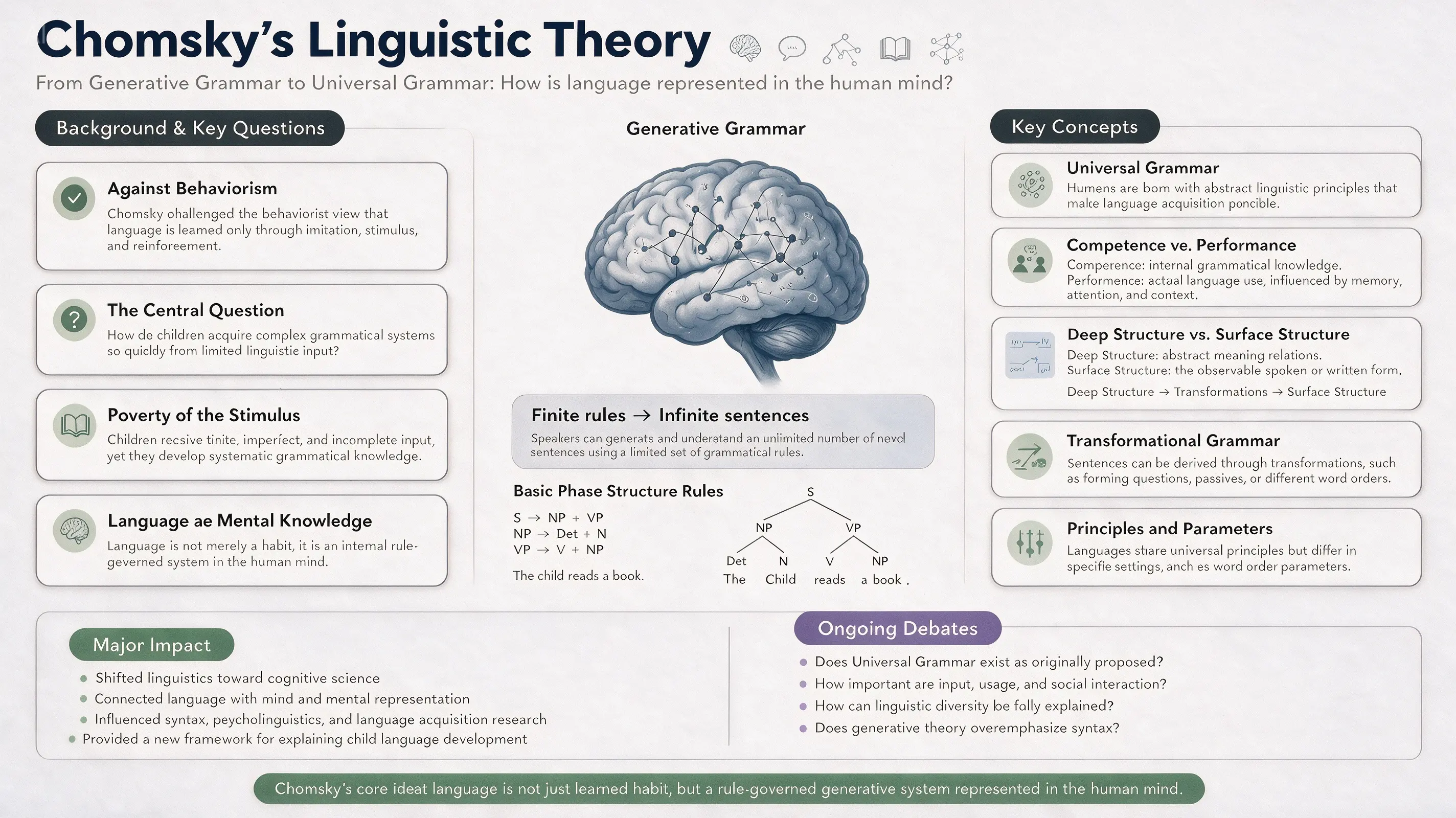
Official Seedream 5.0 Pro explainer graphic on Chomsky's ideas about language

Teaching and professional explainers

Organise ideas into labelled blocks, diagrams and supporting artwork for training decks, talks or editorial explainers. Think of your prompt as an outline of the content with art direction attached.

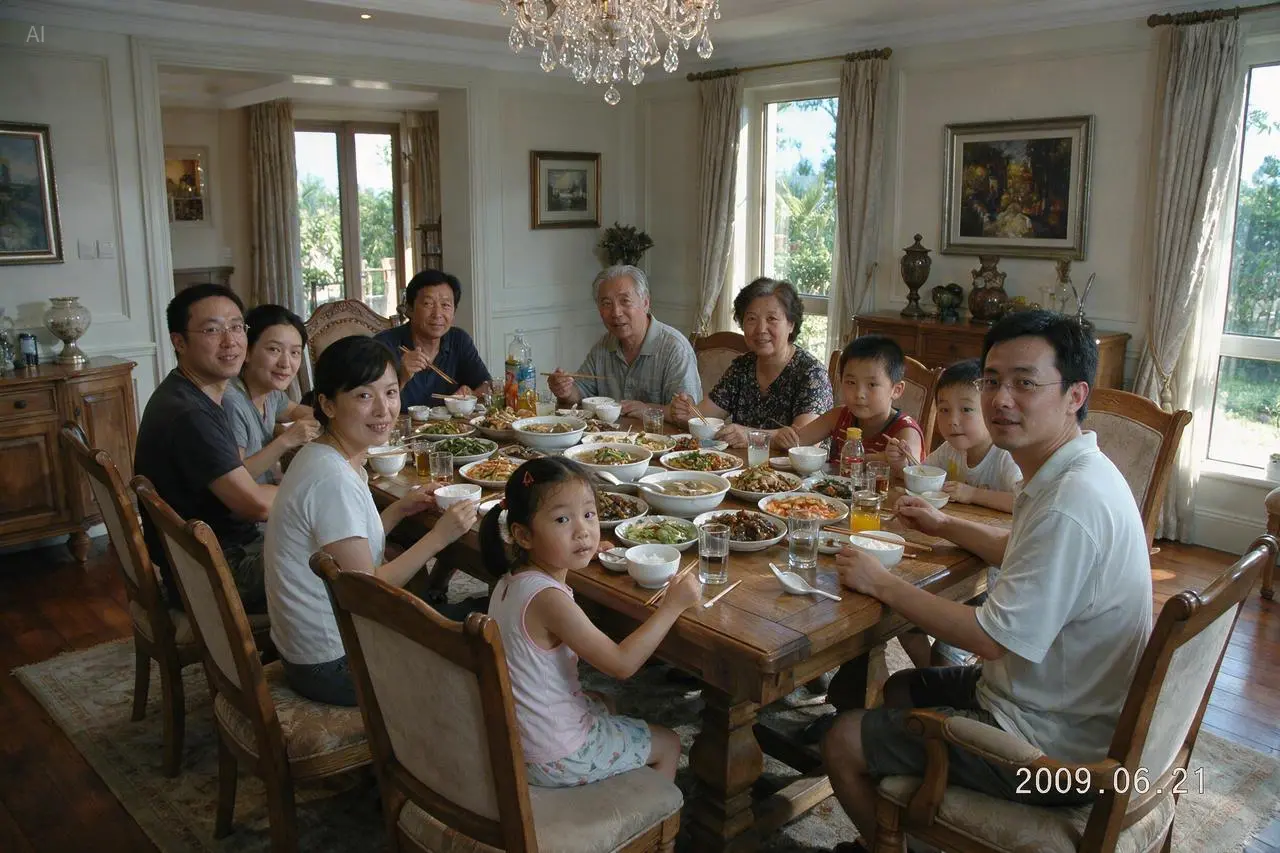
Official Seedream 5.0 Pro photo of a family dinner with eleven people

Convincing people and places

Create documentary-feeling family scenes, food shots or location concepts where convincing light, surfaces and human detail matter more than a heavily stylised look.

Brief Seedream the way you would brief a designer

Seedream does more when your prompt covers both what to show and how it is organised. A good brief names the deliverable, the audience, the hierarchy, the visual language and the constraints.

Prompt template

Asset type and frame shape, then who it is for and why, the subjects or facts to include, the composition and hierarchy, lettering or language, light, materials and finish, and finally anything that must stay unchanged.

Sample prompt for an information-packed poster

A tall 4:5 poster for a science centre explaining how a rainbow forms, aimed at children between 10 and 14. Place a big diagram of sunlight passing through a raindrop in the middle, add three small panels for refraction, reflection and dispersion, keep the English labels short and make it read top to bottom. Soft sky-blue background, charcoal type, bright spectrum accents, crisp vector-style illustrations, plenty of breathing room and no decorative text beyond the labels provided.

01

Give the exact wording

Quote every headline, label and translation the image must contain. Make the first attempt short enough to check easily, then correct any wording in a narrow follow-up edit.

02

Spell out the hierarchy

Name the focal point, the supporting elements and the path the eye should take. For an infographic, describe the hierarchy of sections, how they connect, the labels and the order they are read in.

03

Keep constants and changes apart

In a reference edit, first list the composition, identity, logo or geometry that cannot move, and only then describe the new setting, material, lighting or message.

Use Seedream 5.0 Pro in three steps

Creating from text and generating from references both happen in this workspace. Give the model only as much input as it needs to define the result.

01

Write the brief

Cover the deliverable, the subject, the composition, the wording, the audience and the finish. If the image explains something, describe the content hierarchy instead of just naming a style.

02

Add references, choose output

Attach as many as five references if identity, product shape, composition or scene geometry matters. Choose the ratio first, then 1K for exploring or 2K for detail.

03

Generate, check, refine

Proofread, then inspect small objects, bodies and whether every label points at the right graphic. Aim the next prompt at the weakest spot instead of rewriting everything.

Seedream settings today and credit cost

The table lists only what MuseGen exposes right now; some workflows in ByteDance's broader demos are not available here.

SettingOptionsWhen to pick it
Resolution1K, 2K1K for quick layout tests; 2K once text gets dense, detail gets fine or the work is final.
Aspect ratio1:1, 2:3, 3:2, 3:4, 4:3, 9:16, 16:9Set the final shape before generating so the composition is arranged for the actual poster, feed or screen.
Reference inputOptional, 5 images at mostBring in references when a subject, product, composition, material or scene has to be recognisable in the output.
Credits4 at 1K, 7 at 2KThe generator displays the total before you submit, and any failed generation is refunded.

Pick Seedream when structure comes first

Every model has blind spots. Test your most important prompts on two or three models with the switcher before you produce a full campaign.

SituationSeedream 5.0 ProLook at another model
Dense layouts and diagramsA strong match for information hierarchy, labelled sections, diagrams and compositions full of text.Try GPT Image 2 when the same brief also needs a see-through background or its quality settings.
Copy in local languagesBuilt for prompting in many languages and for text inside the image in widely used languages.Compare models side by side whenever spelling carries legal or commercial weight — and proofread every image regardless.
Changes guided by referencesUseful for holding a composition steady while written instructions change the setting, lighting, material or message.Look at the Nano Banana models when fast iteration, or a different take on several references, matters most.
Largest output sizeOn MuseGen it currently renders at 1K or 2K.If native size outweighs Seedream's skill with structure, choose a model that renders in 4K.

What to check before publishing

A person still needs to review generated design work. ByteDance itself says fine text rendering and pixel-level edit consistency can improve further.

  • Check every headline, label, figure and translation — a persuasive design can still contain a typo or a wrong fact.
  • Inspect hands, faces, repeated items, hairline strokes and small icons up close; a crowded picture can hide flaws a thumbnail never shows.
  • MuseGen works with prompts and reference images only; ByteDance's point selection, lasso and layer separation tools are not available here.
  • Handle generated people, brands and cultural material with care, and secure the rights and approvals your intended publication needs.

Seedream 5.0 Pro FAQ

What exactly is Seedream 5.0 Pro?

It is the multimodal image model from ByteDance Seed, used both for prompt-led creation and for work guided by references. Its official launch highlights visualising complex information, precise editing, photographic quality and output in many languages.

Does Seedream 5.0 Pro do text-to-image?

Yes. Leave the reference slot blank, write a full visual brief, pick a frame shape and choose 1K or 2K. This page already has Seedream 5.0 Pro selected in the generator.

Can Seedream 5.0 Pro edit my images?

Yes. Add one or several reference images and explain what must stay and what should be different. MuseGen supports reference edits driven by prompts; ByteDance's separate point-selection, lasso and editable-layer tools are not included.

What is the reference image limit?

Up to five reference images. Give each one a clear job in the prompt — subject, product, background, composition or visual style.

Which resolutions are available here?

1K and 2K. 1K costs 4 credits, 2K costs 7, and the generator shows the total before anything is submitted.

How good is Seedream 5.0 Pro at infographics and text?

It is a strong choice for structured visuals heavy with text — ByteDance's own examples include technical drawings, teaching explainers and multilingual posters. Proofread any generated words, figures and labels before publishing.

Can I separate the image into layers here?

No. ByteDance demonstrates layer separation as part of the wider Seedream 5.0 Pro feature set, but this page's generator does not include it yet; every request returns a single finished image.

What aspect ratios can I choose?

1:1, 2:3, 3:2, 3:4, 4:3, 9:16 or 16:9. Pick the target format before generating so the composition is planned for where it will appear.

Seedream 5.0 Pro, GPT Image 2 or Nano Banana — which should I use?

Let the job decide. Seedream 5.0 Pro is an excellent starting point for structured layouts, multilingual copy and guided reference edits. Choose GPT Image 2 for its output controls, or Nano Banana when speed and quick variations matter more.

Sources and image credits

Descriptions of capabilities draw on ByteDance Seed's official model page and its launch article. Each example image comes from that official showcase and is hosted locally for reliable loading. Integration details follow KIE's current API documentation.

Make your next brief a finished image

Start with a clear deliverable and hierarchy. Add references only for information words cannot capture, then compare a 1K draft against a 2K final.

Start with Seedream 5.0 Pro