Google DeepMind's top-tier image model

Nano Banana Pro AI Image Generator

Nano Banana Pro is the model to call on when a brief is complicated: it needs high fidelity, crisp typography, real-world knowledge and respectful handling of your references. Create at 1K, 2K or 4K from a prompt alone or from as many as five uploaded images.

  • Prompt or reference workflows
  • Output as large as 4K
  • Failed renders refunded
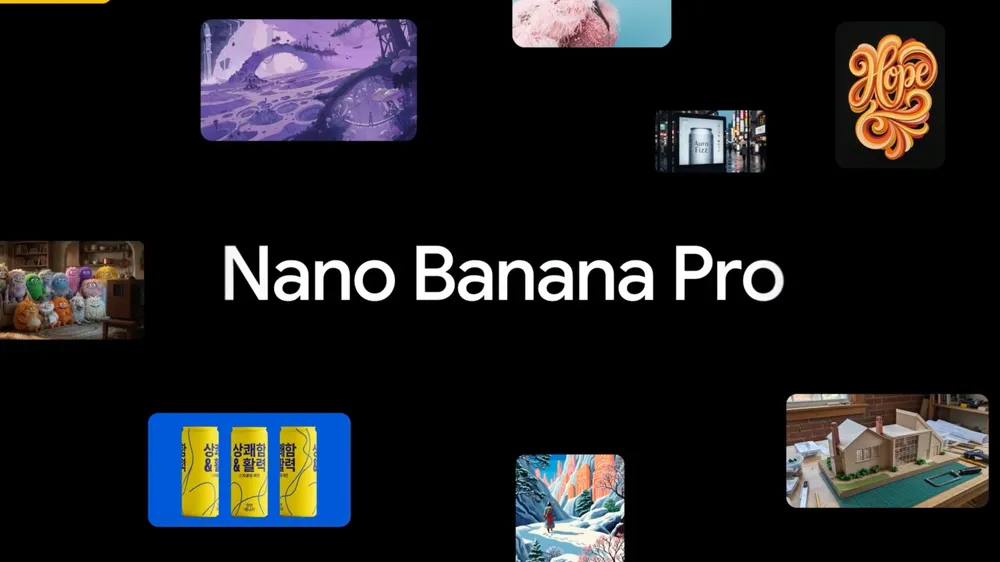
Official Google launch collage for Nano Banana Pro with lettering, characters, packaging and building concepts

Make an image with Nano Banana Pro

Write an exact design brief, choose the final ratio and resolution, and attach a reference image whenever a face, a product's shape, styling or composition has to stay consistent.

Loading the generator…

Nano Banana Pro is preselected for you. Use the model switcher any time you want to compare prompts side by side.

A model that reasons its way to high-fidelity design

Google presents Nano Banana Pro — officially Gemini 3 Pro Image — as the flagship of its image family, aimed at intricate compositions, exact text and professional creative control.

Google launched Nano Banana Pro as its studio-grade model for making and editing images, built on Gemini 3 Pro. The official demos focus on infographics packed with context, readable text in many languages, consistent scenes built from many references, and deliberate changes to focus, light, angle and colour. Those strengths matter when an image has to explain how something works or keep several supplied elements intact — not just look nice.

Learn More

On MuseGen the process stays simple: write a prompt, add as many as five reference images if you like, pick one of seven familiar aspect ratios and render at 1K, 2K or 4K. Google's complete API accepts bigger reference sets and supports extra tool-driven workflows, but those wider limits are separate from the five-image upload on this page.

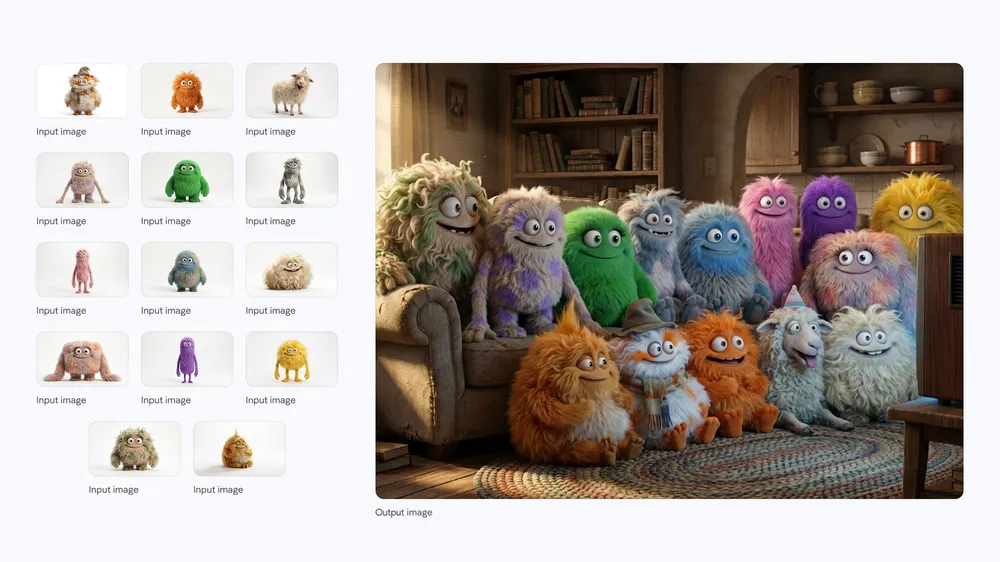
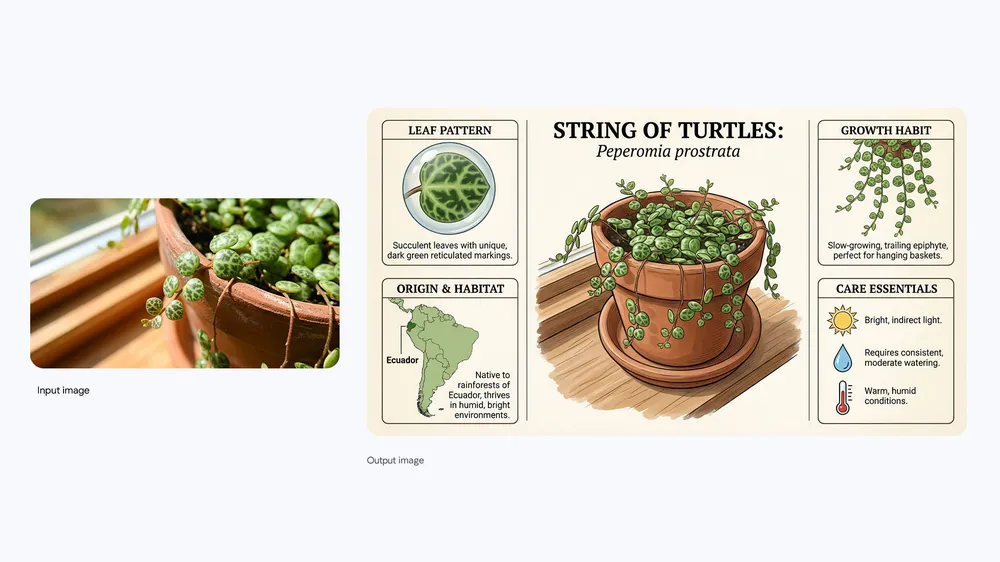
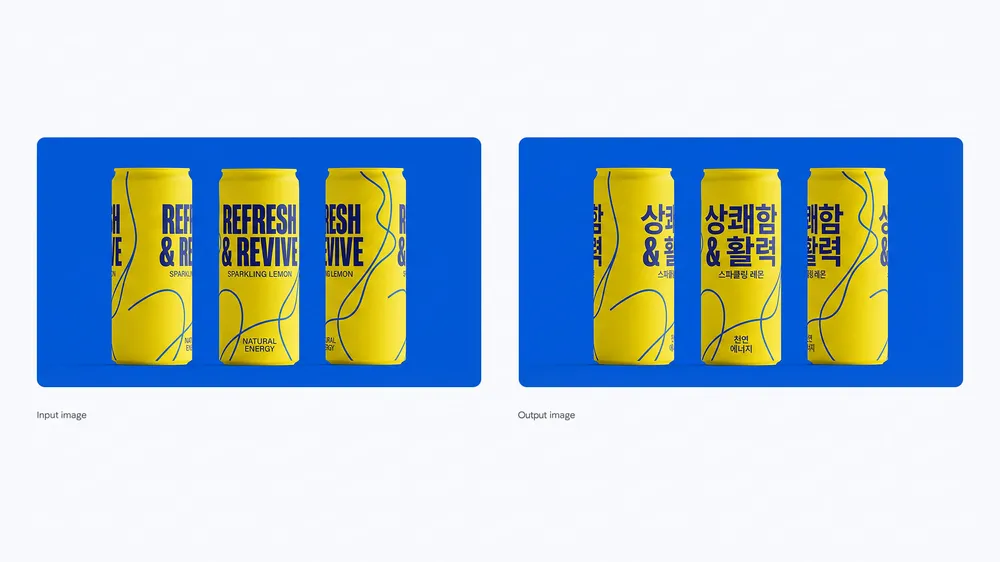
Each official example below makes one claim easy to see. The plant card turns a photo into an organised explainer. The astronaut storyboard keeps a single story coherent across several shots. The translated cans show localised packaging in a real design. Fourteen different characters sharing one room show how the model handles a packed brief without flattening it into a generic scene.

How Nano Banana Pro works on MuseGen

The generator here gives you the hands-on settings listed below. They cover less than Google's full API and reflect exactly what you can do on this page right now.

Input
Text plus 5 images at most

A reference image lets you carry a person, a product, a logo, a layout or a material into a fresh composition.

Resolution
1K, 2K or 4K

Every tier is open to you, with no extra quality menu to manage.

Aspect ratios
7 shapes

Produce square, tall, wide and phone-shaped images to fit wherever they will run.

Credit cost
4 or 5 credits

4 credits at 1K or 2K; 5 credits per image at 4K.

Four reasons Nano Banana Pro is worth the premium

Every example is an official Google output, chosen because it matches the behaviour described beside it.

Official Nano Banana Pro String of Turtles plant infographic made from a reference photo

Infographics full of knowledge

Give it a subject and a list of facts to cover and it builds an explainer with headings, labelled sections and supporting art. Google's succulent card treats the plant photo as evidence and arranges origin, care and growth notes around it.

Start with Nano Banana Pro
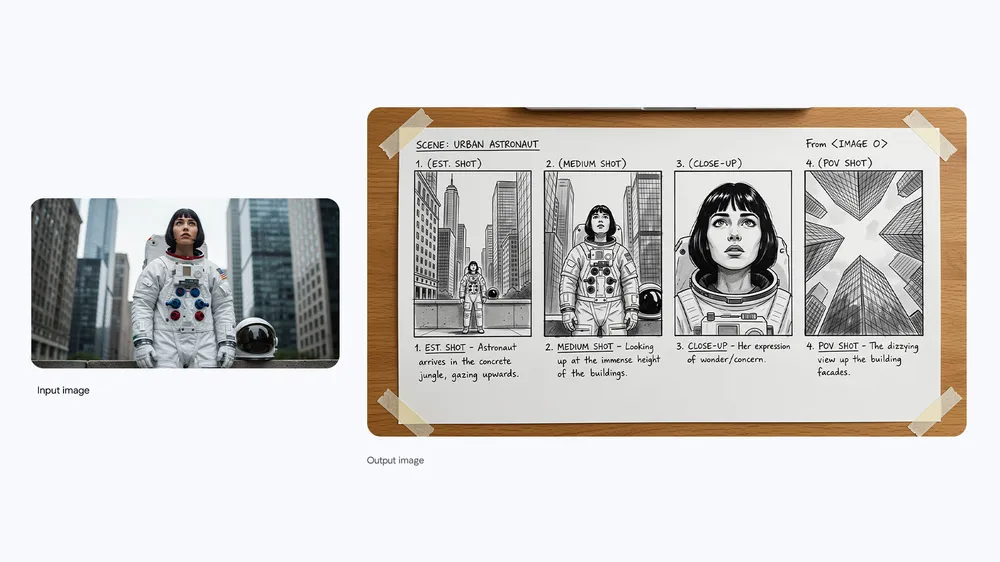
Official Nano Banana Pro Urban Astronaut storyboard in four panels

Storyboards that stay consistent

Map out several camera views while the character, setting and story stay the same. The Urban Astronaut board fits a wide establishing shot, a medium shot, a close-up and a point-of-view frame into one coherent page.

Start with Nano Banana Pro
Official Nano Banana Pro drink cans shown in English and in Korean

Translated text inside real designs

Go beyond swapping a label by fitting readable copy into a product or campaign layout. The two drink cans carry English and Korean wording while the pack keeps its identity.

Start with Nano Banana Pro
Official Nano Banana Pro scene of fourteen distinct fluffy characters watching TV

Busy scenes from many references

Place lots of recognisable subjects in one setting while each keeps its colours, shape and personality. In Google's living room, fourteen fluffy creatures crowd round a TV and the group never falls apart.

Start with Nano Banana Pro

Change the light and keep everything else in place

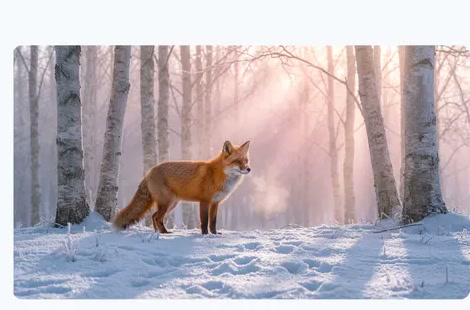
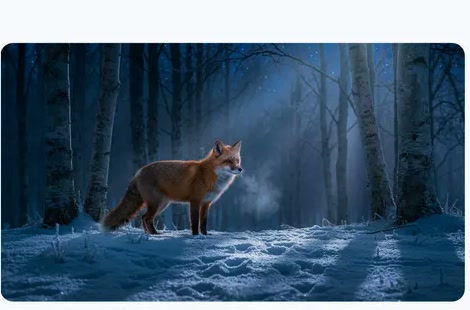
A strong reference edit names the geometry that stays before asking for a new mood. In Google's fox example, day becomes night while the animal, the camera and the snowy forest hold still.

Official Nano Banana Pro input: a fox standing among snowy birches in daylight
Daytime original
Official Nano Banana Pro edit: that fox and birch forest, now lit by night
Night-time edit

Turn this scene into nighttime. Keep the fox in the same position, preserve the snowy birch forest and camera angle, and replace the warm daylight with believable cool moonlight and deep blue shadows.

Use Nano Banana Pro when many requirements have to land at once

It earns its cost when fidelity, facts, wording and staying true to every upload all shape the final asset.

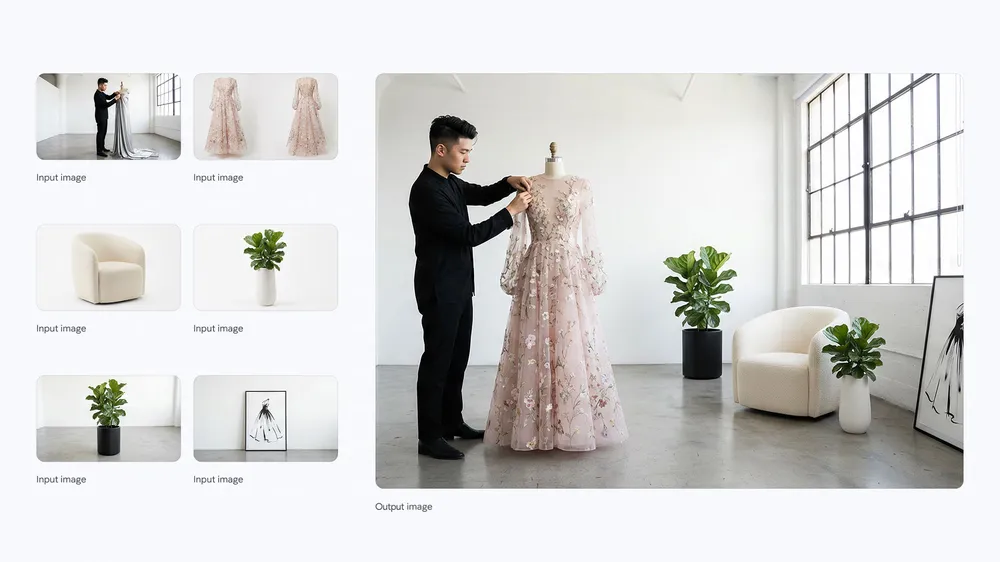
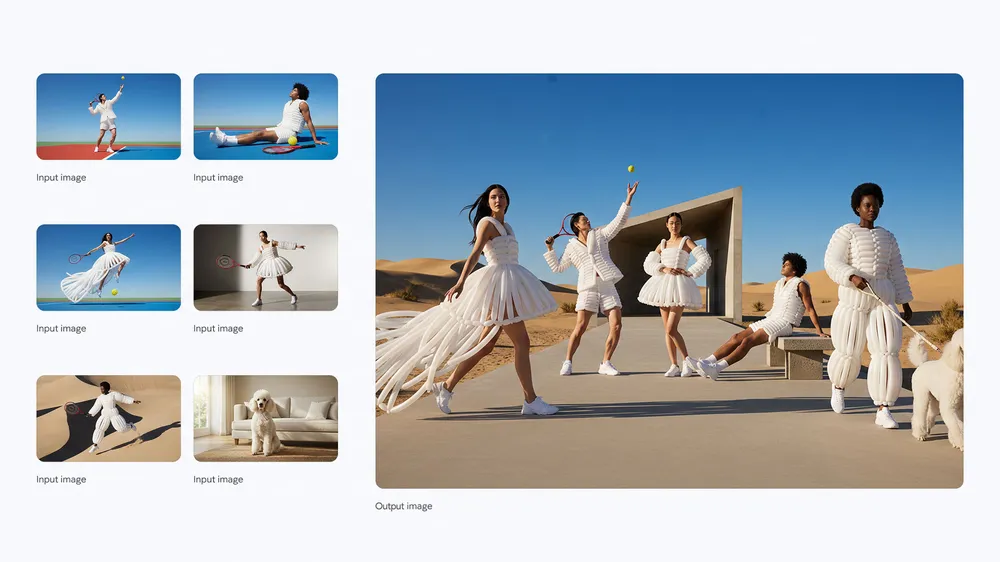
Official Nano Banana Pro fashion scene combining several people, outfits and set references

Campaign shots built from many assets

Merge people, outfits, products and set references into one editorial look. Say which faces and objects must stay recognisable, then set the camera, the light and the final format.

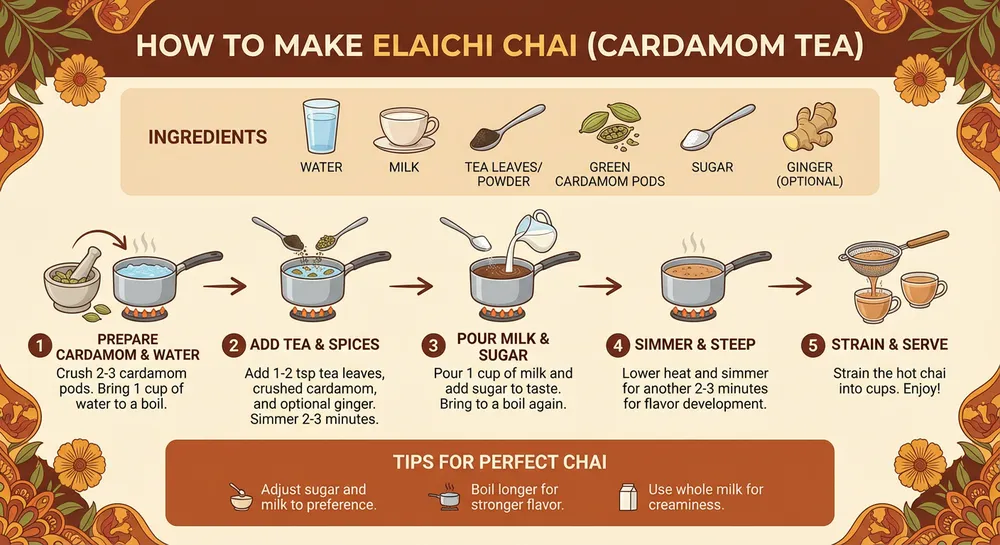
Official Nano Banana Pro recipe graphic showing how to brew elaichi chai

Teaching and how-to graphics

Make recipe cards, step-by-step diagrams and explainers that depend on a clear sequence and readable labels. Check every step and fact before you share the image.

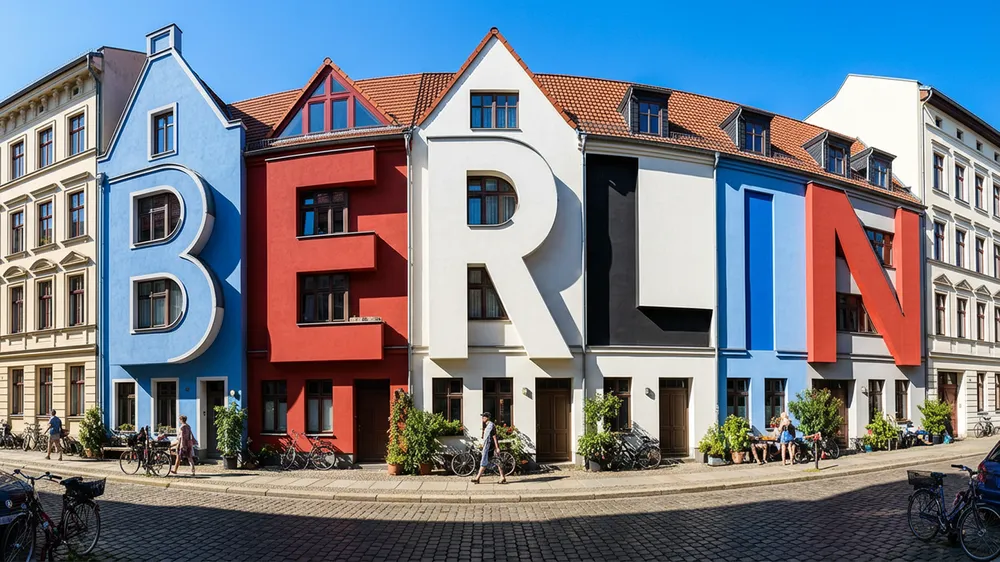
Official Nano Banana Pro Berlin street where the building fronts quietly spell BERLIN

Ideas led by lettering

Weave a word into buildings, packaging or a real-world scene rather than laying plain text over a backdrop. Describe the material, where it sits in space and how readable it should be.

Prompt Nano Banana Pro like an art director would

Keep what you supply apart from the new creative direction you want. The model performs better when each uploaded reference has a named job and the output has a clear purpose.

Prompt template

What it is and who it is for + required subjects and the job of each reference + layout and camera + exact wording and its language + light, materials and colour grade + ratio and rules + details that must not change.

Sample prompt for a campaign image from several references

A 16:9 premium winter campaign image built from the uploaded model, parka and snow-boot references. Hold on to his identity, the precise colour panels of the parka and the outline of the boots. He strides across a frozen lake at dawn toward a camera placed low and off to one side. Fur trim moving in the wind, cold pale light with a faint pink sunrise on the horizon, space on the right for a headline, and no logo or wording added.

01

Give every reference a job

Say which reference image sets identity, outfit, product, layout or style. A pile of unlabelled uploads leaves the model guessing how to combine them.

02

Spell out pro camera choices

Name the angle, the focal point, the depth of field, where the light comes from and the colour grade. Those specifics help far more than asking for something cinematic.

03

Treat text as provided copy

Put exact headlines and translations in quotes, rank them by importance and keep the first layout easy to proofread. Fix key copy in a focused second pass.

Use Nano Banana Pro in three steps

Start from a clear production goal, add references only when they bring essential information, and review the 4K result as carefully as any commissioned piece.

01

Write the brief

Define the asset, the audience, the message, the layout and the finish. Include every line of copy and separate hard rules from creative preferences.

02

Add references, pick resolution

Upload up to five helpful reference images, choose the final ratio, and use 1K or 2K (4 credits) for drafts or 4K (5 credits) for detailed final work.

03

Check faces, copy and detail

Go over every face, product feature, label, hand and small object. Fix one category per round so the parts that work are left alone.

Nano Banana Pro settings and credit cost

MuseGen prices this model by resolution only and does not add a separate quality setting.

SettingOptionsWhen to pick it
Resolution1K, 2K, 4K1K to find a direction, 2K for most digital uses, 4K when fine detail or large output counts.
Aspect ratio1:1, 2:3, 3:2, 3:4, 4:3, 9:16, 16:9Match the final frame before generating so you never crop away carefully placed people, text or products.
Reference inputOptional, 5 images at mostOnly upload a reference when it carries identity, object, layout or style information you actually need.
Credits4 at 1K/2K, 5 at 4KThe cost is shown before you submit, and MuseGen returns credits if a generation fails.

Pick Nano Banana Pro for the toughest briefs

Pro is Google's quality-first option. Choose a lighter model when the work is exploratory, repetitive or mostly limited by speed and volume.

SituationNano Banana ProLook at another model
Scenes built from many inputsA great fit when several people, products or visual elements must all stay recognisable together.Switch to Nano Banana 2 for quick, high-volume variants once the visual system is settled.
Infographics and translationMade for knowledge-heavy graphics, longer text inside images and adapting designs to other languages.Try Seedream 5.0 Pro when information structure and directed design changes are the main challenge.
Studio-level controlResponds well to detailed direction on camera, focus, light, colour and layout.Go with GPT Image 2 when transparency or explicit Standard, Medium and High quality tiers help more.
Cost per iteration1K and 2K currently cost 4 credits, and 4K costs 5.Nano Banana 2 starts at 2 credits and suits bigger batches of exploratory ideas.

Review the output like a professional asset

High fidelity cuts down on clean-up, but you still need to check facts, rights and visual quality.

  • Read every headline, label, measurement, translation and instruction before anyone else sees the image.
  • Confirm each referenced subject kept the right identity, outfit, product shape and relative size.
  • Look closely at hands, eyes, repeating patterns, small logos, shadows and reflections at full size.
  • You receive a flat raster image, not an editable design with separate text and object layers.
  • Only upload images you are allowed to use, and complete a rights check before commercial use.

Nano Banana Pro FAQ

What exactly is Nano Banana Pro?

It is Google's premium model for generating and editing images, officially called Gemini 3 Pro Image, built for high-fidelity, knowledge-rich and professionally controlled visuals.

Can Nano Banana Pro edit a picture I already have?

Yes. Upload the source image and describe what should change, plus the identity, geometry, camera, product or layout details that must stay fixed.

Can I generate in 4K here?

Yes. MuseGen offers 1K, 2K and 4K. 4K costs 5 credits, while 1K and 2K currently cost 4.

What is the reference image limit?

Up to five images in this interface. Google's model documentation describes larger reference sets, but the five-image limit is what applies on this page.

How good is Nano Banana Pro at text and infographics?

It is pitched specifically at readable text, localisation, diagrams and context-rich infographics. Key facts, spelling and translations still need a person to verify them.

Will several people stay consistent?

High-fidelity composition from multiple references is one of its design goals. Results improve when each reference image is clear and the prompt states which identities and features must be kept.

Is Google Search grounding available on MuseGen?

No. Google's own products and API docs describe grounded workflows, but this page currently offers prompt and reference-image generation only, without a Search-grounding option.

How much does Nano Banana Pro cost here?

4 credits for a 1K or 2K image and 5 credits for 4K. You see the total before generating, and failed jobs are refunded.

When is Nano Banana 2 the better choice?

When speed, volume and low cost per round matter more than Pro's maximum fidelity and control. It is especially handy for testing several directions before a premium final pass.

Sources and where the examples come from

Model details and official examples are taken from Google DeepMind's launch material and current Gemini documentation. Where MuseGen's settings differ from Google's wider API, this page describes them separately.

Create the high-fidelity version of your idea

Give each reference a purpose, settle the final frame early, and let Nano Banana Pro turn the whole brief into one polished image.

Start with Nano Banana Pro