


Omni-modal video model by MiniMax

Official model guide and online generator

MiniMax H3 AI Video Generator

Generate 2K video with native stereo sound from text, frames, and up to fifteen reference images, clips, and audio tracks at once. Use the MiniMax H3 AI video generator directly below to create from a prompt, image, frame pair, or supported references.

MiniMax H3 AI video generator demo clip
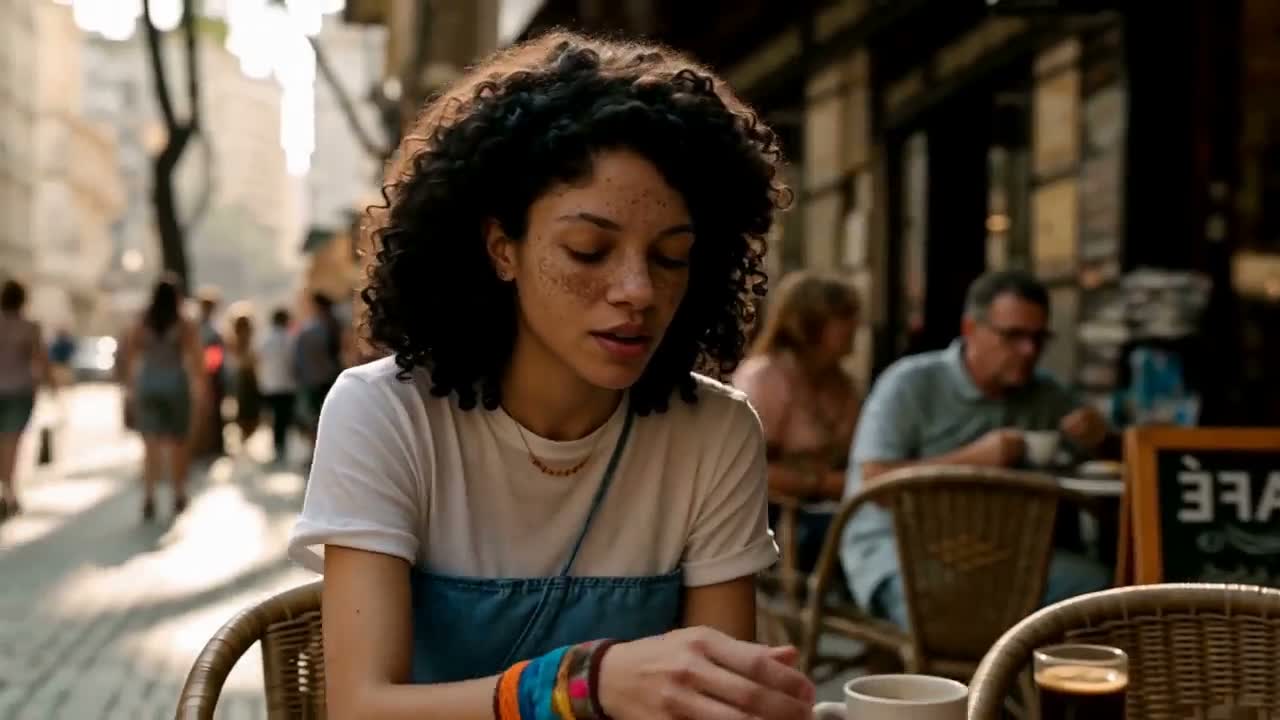
Launch footage from MiniMax, re-encoded for the web. It was generated from one reference video, one reference image and one reference audio clip.

Generate with MiniMax H3 online

The complete MuseGen video workspace is embedded here and starts with MiniMax H3 selected. You can still compare variants or switch models without losing the rest of the workflow.

Loading the MiniMax H3 AI video generator…

Generation requires an account and uses credits based on the selected model, variant, duration, resolution, and other settings. Failed tasks are refunded automatically.

What is MiniMax H3 and when should you use it?

MiniMax H3 — sold as Hailuo 3.0 through MiniMax's Hailuo app — is a general omni-modal generator built that way from the start, not a prompt-to-clip model that later gained an upload slot. Words, pictures, footage and sound arrive as one shared context, and it returns video with 32 kHz stereo audio produced in the same pass. Earlier systems needed a separate specialist for every job: writing a clip from text, animating a still, bridging two frames, subject reference, motion reference, editing. H3 handles all of that in one model that understands, in ordinary language, what each reference should contribute.

Native resolution at 24 fps
2K

Native resolution at 24 fps

Length, in whole seconds
4–15s

Length, in whole seconds

Images, clips and audio files per render
9+3+3

Images, clips and audio files per render

Built-in stereo audio on every take
32 kHz

Built-in stereo audio on every take

Omni-reference

Text, image, video and audio — one context.

MiniMax's own demo is the plainest evidence of how H3 differs from a prompt-to-clip model that merely accepts uploads. It received a clip, a still and a sound file — three kinds of input — plus a single sentence on how they fit together. No mode switching, no extra motion-transfer tool and no separate pass to dub in the voice.

What went in

Video 1
Image 2
Image 2
Audio 3

“Reference the Hitchcock camera movement from Video 1, have the character in Image 2 sing, with the vocals matching Audio 3.”

In practice

What higher resolution and a built-in soundtrack really give you

2K that survives a full screen

Because H3 renders 2K natively rather than blowing up a smaller frame, skin, woven cloth, reflections and fine on-screen lettering hold up when the clip fills an entire display instead of a thumbnail in a feed. The gain is biggest on the shots that once meant a reshoot or retouch: tight close-ups, product finishes and anything detailed sitting close to the frame's border.
One model for voice, effects and music

Audio is not a separate step. H3 predicts the sound and picture latents together and outputs 32 kHz stereo with dependable dialogue in eleven languages, so mouths and voices are created in lockstep instead of being synced afterwards. Every render on this page arrives with its soundtrack — you cannot forget to switch audio on.

How H3 reaches 2K

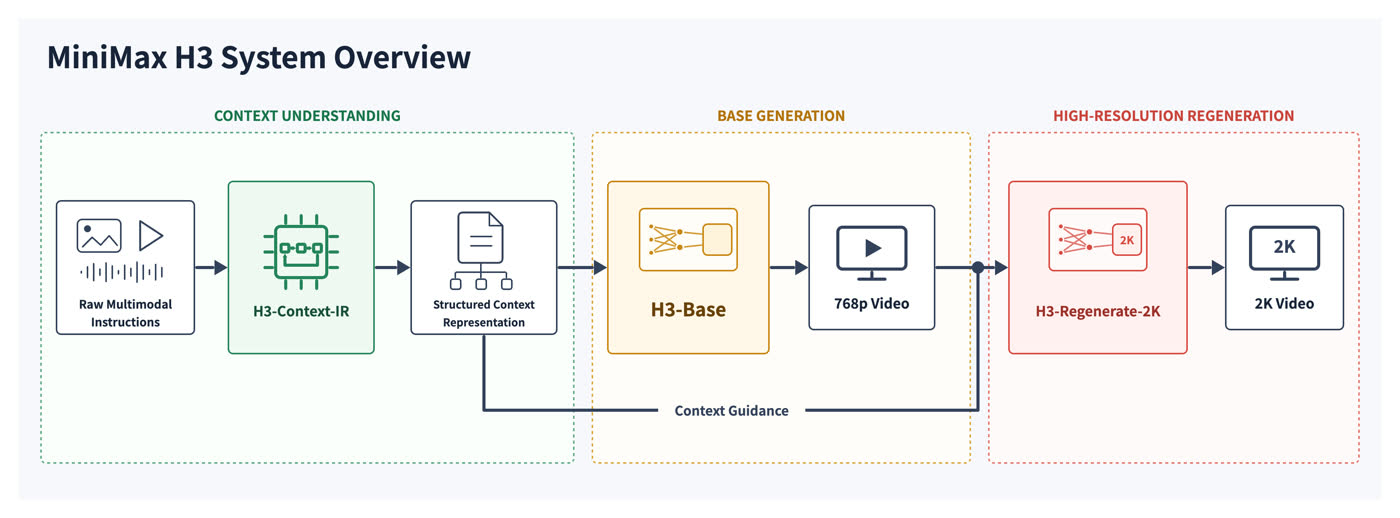
Three stages do the work. H3-Context-IR takes whatever mix of inputs you give it and turns it into a structured context. H3-Base first draws image and audio side by side at 768p. H3-Regenerate-2K then sends that draft through the model a second time alongside your original inputs, so the extra resolution is built from the scene itself rather than interpolated over it.

MiniMax H3 pipeline: context understanding, 768p base generation and 2K regeneration

MiniMax H3 vs Hailuo 2.3

MuseGen offers both. Hailuo 2.3 stays the budget pick for expressive single-shot motion; go to H3 whenever you need audio, multiple references or delivery-grade resolution.

FeatureHailuo 2.3MiniMax H3
ModesPrompt or image to videoPrompt, image, start and end frames, or omni-reference
Resolution768p or 1080p768p or native 2K
Length6 or 10 secondsAny whole second from 4 to 15
AudioNone; add sound in postNative 32 kHz stereo, made with the picture
Reference inputsA single starting imageAs many as 9 images, 3 video clips and 3 audio clips
Aspect ratios16:9 widescreenFrom 21:9 to 9:16

The four jobs MiniMax designed it for

MiniMax supplied each clip below as its example for that category; all were rendered by H3 and compressed for this page. The generator at the top of the page offers the same modes.

Opening titles for film

Make title openers that cut from shot to shot and arrive with music and sound effects already in place, at a resolution fit for delivery.

Product launch pages

Make hero loops and scrolling sections for a launch site, with reference images keeping the product steady.

Motion posters

Bring a hero image to life as an upright animated piece for app store pages, digital billboards and social placements.

Ads and online retail

Direct short vertical spots where voice-over, effects and music are generated with the picture in a single pass.

Start generating

How to create video with MiniMax H3

Move from a creative idea to a configured MiniMax H3 generation without leaving this model page.

1

Describe the shot

Write the subject, action, environment, camera, style, timing, and sound. If you have reference media, upload it and explain the role of each asset.

2

Configure MiniMax H3

Keep MiniMax H3 selected, choose the appropriate variant, mode, duration, aspect ratio, resolution, and audio settings, then check the displayed credit cost.

3

Generate, review, and reuse

Start the task, follow progress in the result panel, review the completed video, reuse its settings for another take, or download the finished file.

MiniMax H3 AI video generator FAQ

What exactly is MiniMax H3?

It is the all-round omni-modal video model MiniMax launched on 31 July 2026, which the Hailuo app labels Hailuo 3.0. Words, stills, footage and sound are read together as a single context, and the output is video with native stereo sound — 2K at most, fifteen seconds at most. It takes over from Hailuo 2.3 as MiniMax's flagship.

How does H3 differ from an ordinary text-to-video model?

Most pipelines split the work between specialist models — one writes clips from text, one animates stills, one bridges two frames, and others handle subject reference, motion reference or editing. H3 learned all of this as one network during pre-training and understands, in plain language, how your references connect to the shot you want. So a single prompt can borrow a camera move from a clip, a character from a still and a vocal from a sound file.

What resolution and length does MiniMax H3 support?

Clips last anywhere from 4 to 15 seconds in whole-second steps, at 24 fps, rendered in native 2K or 768p. Aspect ratios range from 21:9 to 9:16, including 16:9, 4:3, 1:1 and 3:4. With a prompt alone you have to choose an aspect ratio yourself; once frames or references are attached, they decide the output shape.

Can MiniMax H3 create audio?

Every time. Each render comes with 32 kHz stereo and audio cannot be disabled, since the model works out image and sound jointly instead of one after the other. Spoken lines hold up well in eleven languages — English, Spanish, French, German, Italian, Portuguese, Russian, Arabic, Chinese, Japanese and Korean.

How many reference files can I add?

As many as 9 images, 3 video clips and 3 audio clips, with a maximum of 12 files overall. Every video or audio clip has to be 2 to 15 seconds long. Audio cannot be your only reference — pair it with an image or a video so the model knows what the sound belongs to.

Can first and last frames be mixed with reference files?

No, and the generator flags it before any credits are spent. H3 has two input modes: a frame mode that accepts zero, one or two images as the opening and closing frames, and an omni-reference mode for mixed image, video and audio references. Frames and references live in separate modes, so choose the one that gives you the control you need.

What does MiniMax H3 cost on MuseGen?

Credits are charged per second of output and depend on resolution, with 768p costing noticeably less than 2K. The first five reference images are included, and each additional image adds a small amount. The exact cost for your settings is shown in the generator before you start, and failed tasks are refunded automatically.

Are the MiniMax H3 weights publicly available?

Yes. MiniMax released the full weights on Hugging Face on 3 August 2026 under the MiniMax H3 Community License, with fine-tuning supported; the first release ships full-attention inference, and a sparse-attention version is due later. Running it yourself needs serious hardware, so the generator on this page uses the hosted model instead.

Official MiniMax H3 sources

Model capabilities and media on this page were researched from the developer's official product pages, announcements, and documentation.

Create your next video with MiniMax H3

Open the complete MiniMax H3 AI video generator above, add your prompt or references, and turn the next shot on your list into a finished video.

Start generatingBrowse all models