

Bulk Image Renamer
Swap messy names like IMG_4521.jpg for tidy, keyword-rich ones like blue-cotton-tshirt-front.jpg — rename a whole batch at once. Set up a naming rule once, see each new name next to its thumbnail, then download the renamed ZIP. It is free, and your files never leave the browser.
Renaming and zipping happen locally inside your browser.
Can't find what you need? Write us a message and we'll get back to you.
Why image filenames matter for SEO
Filename SEO is a small yet real signal, giving search engines and asset libraries another clue about an image's contents. IMG_4521.jpg tells nobody anything. blue-cotton-tshirt-front.jpg reads naturally, is simple to audit and matches the product page it appears on.
For online stores there is a day-to-day benefit too. Once product photos, ads and content share one naming scheme, gaps in angles stand out, batch reviews go faster, and the wrong picture rarely ends up on the wrong page.
The routine that works is simple: rename your product images in bulk before you upload, keep the names descriptive, check the thumbnails, and support the new filenames with precise alt text and relevant on-page copy for SEO.
IMG_4521.jpgblue-cotton-tshirt-front.jpg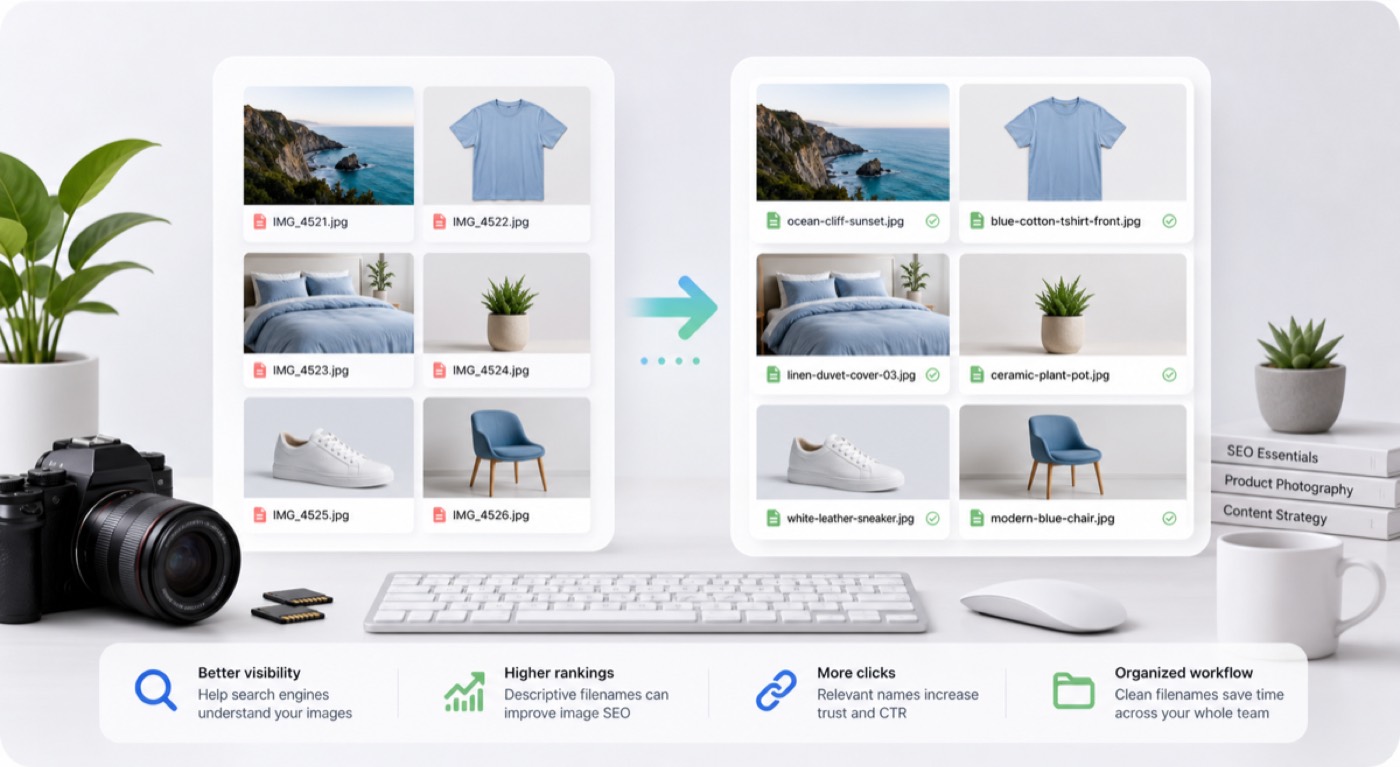
How the bulk image renamer works, step by step
Three steps to bulk rename images, from raw camera codes to descriptive, web-ready filenames.
Upload images locally
Drag in product shots, photos or an entire export folder. Everything stays in your browser, and the image data itself is never modified.
Create a naming rule
Combine variables — Custom name, a counter, the old filename, a date, the pixel size or the file size — and arrange the template however you like.
Download renamed ZIP
Compare thumbnails with the old and new names, let duplicate names be fixed automatically, and grab everything as one ZIP.
Example templates for the bulk image renamer
Mix tokens to create descriptive, predictable filenames you can always match back to the source folder.
| Template | Example result | Best used for |
|---|---|---|
| {name}-{n} | blue-tshirt-01.jpg | Great when a batch revolves around one product or keyword and all images should share that phrase. |
| {filename}-{width}x{height} | shoe-front-1200x1600.jpg | Keeps the original filename and appends image dimensions when size matters for handover or QA. |
| {filename}-{date} | IMG-4521-2026-07-08.jpg | Holds on to part of the camera's filename and adds a date so archives sort neatly. |
| {name}-{n} | linen-duvet-cover-003.webp | Combines a custom name with a running number when the whole set comes from a single product, photo shoot or campaign. |
When a bulk image renamer earns its keep
Bulk rename images any time the filename should mean something for search, uploads or team handovers.
Ecommerce image SEO
Rename product images in bulk before they go to Shopify, WooCommerce, Amazon or Etsy, so every listing shows a readable product keyword instead of a camera code such as IMG_4521.
Photography delivery
Rename camera exports into client-ready sets using the shoot date, the location, the subject or a sequence number, while the pictures themselves stay untouched.
Asset organization
Sort out files downloaded from marketplaces, design apps or ad libraries so anyone can search, order and pass the folder on without guesswork.
Content operations
Use one shared custom name plus dates, pixel sizes and counters to match filenames to a campaign, a landing page or a content library.
A bulk image renamer designed for SEO-ready folders
It is about more than new file names: it makes the entire image folder predictable for SEO, uploads, team reviews and archiving.
Reusable filename templates
Assemble names from reusable variables — a product keyword, a counter, the old name, a date or the pixel dimensions — so every file follows one clear rule.
Choose variables, then adjust
Drop variables in with a click, then type straight into the template to rearrange them, swap separators or reword it before you export.
Thumbnail preview with de-duplication
Each new filename sits next to its image thumbnail before you export, and clashes are resolved automatically with obvious suffixes.
SEO-safe cleanup controls
Force lowercase, choose hyphens or underscores, set a length limit and keep every extension consistent.
Renamed ZIP export
One ZIP holds every renamed image, keeping the batch together for uploading, sharing or archiving.
Private browser processing
The bulk image renamer works entirely in your browser: nothing uploaded, no account, no watermark and no server copy of your files.
How to rename images for better SEO
Treat the bulk image renamer as one piece of a tidy image SEO process, never as a keyword stuffing tool.
Start with meaningful words
Choose the product, colour, material, angle or category a shopper would type. Filenames that describe the image help people and search engines understand a folder quickly.
Stick to one pattern
Settle on one order — product-colour-angle-number, say — and stick to it for the whole batch. Consistency beats cramming every possible keyword into a single filename.
Back filenames up with alt text
Good filenames help, but most ranking weight still comes from alt text, captions, nearby copy, compression and accurate product data.
Bulk image renamer questions
Is the bulk image renamer genuinely free?
Yes. The bulk image renamer costs nothing, needs no sign-up and adds no watermark. New filenames and the ZIP are created in your browser.
Do my images get uploaded?
No. Your images never leave your device. The tool relies on browser File APIs to read names, draw thumbnails and build the ZIP locally, so nothing is sent to MuseGen.
How can I give a whole batch the same product name?
Use the Custom name variable when the whole batch belongs to one product, shoot or campaign. Add the number variable for a running count, or include the old filename so part of it survives in the new name.
Will renaming affect image quality?
No. Files are packed into the ZIP untouched, with no re-encoding, so a rename never alters pixels, colour, compression, metadata or visual quality.
What makes an image filename good for SEO?
Pick short, descriptive words, put the main product keyword near the start, join words with hyphens, skip keyword stuffing, and use one consistent pattern across the whole set.
Which image formats can be renamed?
It takes any image file your browser can read, including JPG, PNG, WebP, GIF, AVIF, SVG, HEIC and HEIF. The file data is kept intact and extensions can be preserved or made lowercase.
What if two files end up with the same new name?
Yes. When two images would clash on the same filename, a suffix such as -1 or -2 is appended automatically and the affected rows are highlighted.
Can I rename hundreds of photos in bulk?
Yes — big folders are what it was built for. Your device's memory sets the practical limit, since the ZIP is put together locally in the browser.
Do new filenames alone boost rankings in Google Images?
Renaming keeps files organised and can support image SEO, but it pays off most alongside helpful alt text, relevant copy around the image, compressed files and a tidy product page.
Can I download every renamed image in one go?
Yes. After checking the preview, click Download renamed ZIP to save every image in one file. Your original files are copied byte for byte into the ZIP and never uploaded.
Give your image folder SEO-friendly names
Load a folder, scan the thumbnails, and save every renamed image in a single ZIP.