Fast, efficient image model by Google DeepMind

Nano Banana 2 AI Image Generator

Nano Banana 2 gives you finished-looking images at Flash speed. Type a prompt or feed it as many as five reference images, then choose 1K, 2K or 4K for ad campaigns, story panels, product mock-ups and everyday creative jobs.

  • Quick prompt and reference workflows
  • Output at 1K, 2K or 4K
  • Failed renders refunded
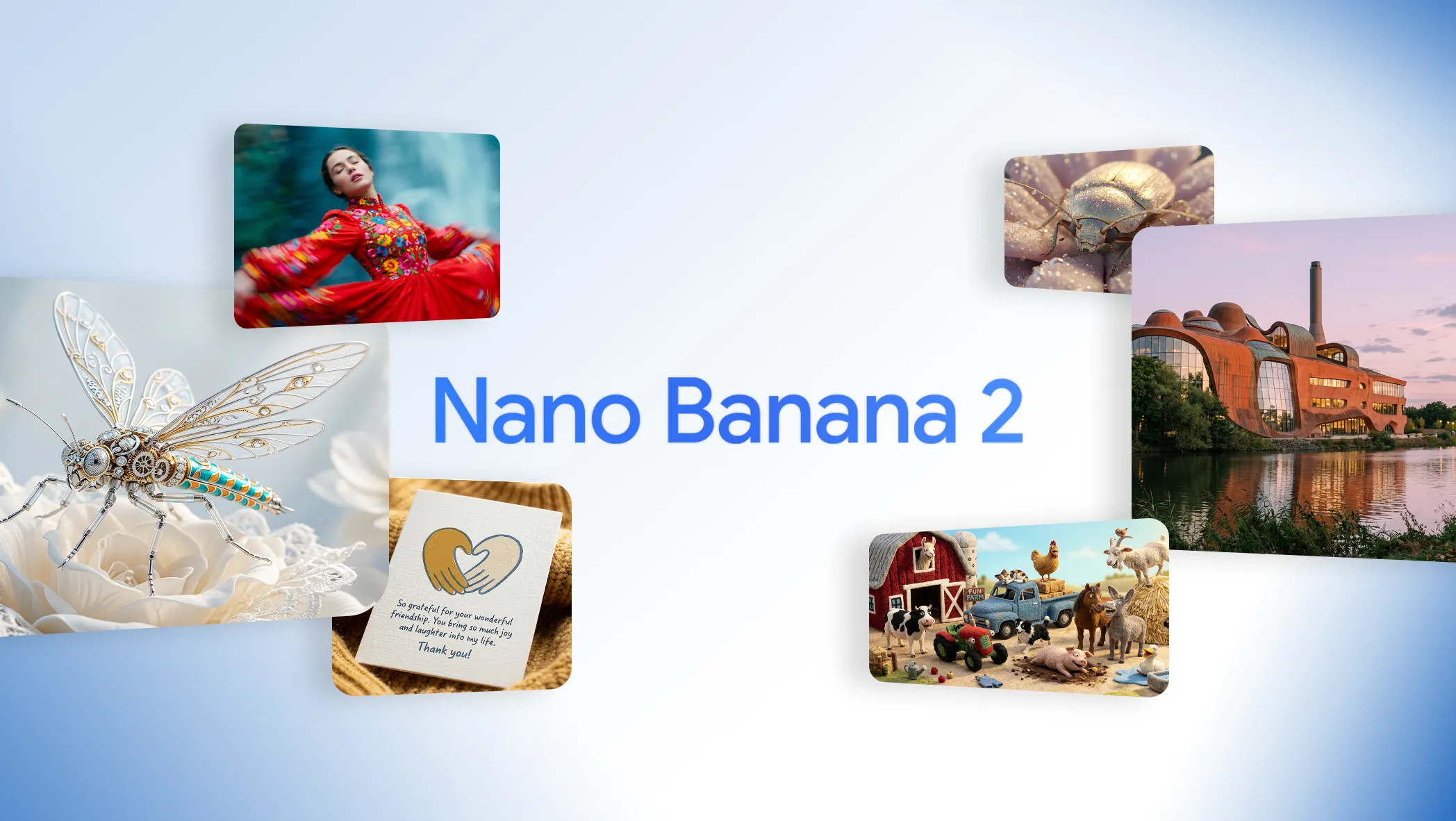
Official Google launch artwork for Nano Banana 2: jewelled beetle, dancer, buildings and farm animals

Make an image with Nano Banana 2

Explain what the image is and where it will appear, set a ratio and resolution, and attach only the references needed to hold on to a person, a product, a look or a layout.

Chargement du générateur…

We preselect Nano Banana 2. Try another model when the same prompt deserves a premium pass or a different kind of control.

Pro-grade range with Flash-tier speed

Google's official name for Nano Banana 2 is Gemini 3.1 Flash Image: an efficient, general model built for fast creation, quick edits and output in volume.

Google positioned Nano Banana 2 as the faster alternative to Nano Banana Pro, bringing strong text rendering, consistency between images, broad world knowledge and high-resolution output to routine production. The official gallery ranges from flat-lay explainers and translated signage to crowded casts, panel stories, photoreal scenery and stylised portraits, so speed does not come at the cost of range.

Learn More

MuseGen exposes two ways in: describe an image from scratch, or guide it with up to five uploaded pictures. You can choose among seven familiar frame shapes and render at 1K, 2K or 4K. The underlying model supports Google Search and Image Search grounding, yet our generator has no switch for it — put every fact and visual cue the picture depends on directly into the prompt.

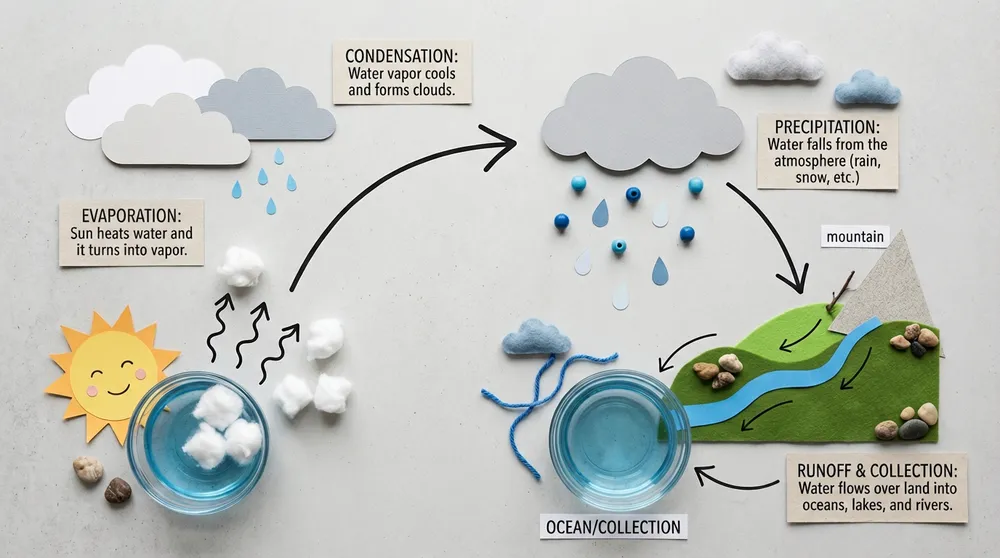
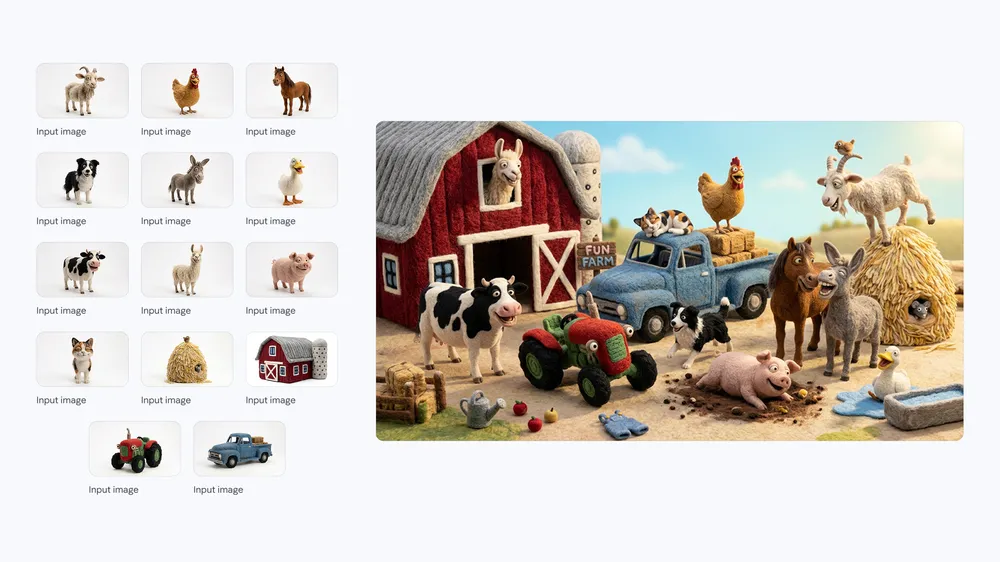
Each official example below was picked because it proves something you can see. The flat lay of the water cycle checks how information is ordered. The wildlife sign checks translation inside a designed object. The busy farm and the treehouse panels check consistency across many subjects and shots. The portrait edit is the real-world test: a fresh outfit and setting, same recognisable person.

How Nano Banana 2 is set up on MuseGen

These are the options the built-in generator offers today. They describe our integration, not every setting in Google's wider Gemini API.

Input
Prompt, plus 5 images max

Text alone works; references help when identity, exact objects, edits or continuity matter.

Resolution
1K, 2K or 4K

Explore quickly at 1K, then switch to 2K or 4K once the direction is ready to ship.

Aspect ratios
7 shapes

Make square, wide, tall and phone-first frames without cropping afterwards.

Credit cost
2 or 3 credits

1K is 2 credits; 2K and 4K are both 3 credits right now.

Four tasks Nano Banana 2 handles with speed and variety

Next to each ability sits an official Google example that demonstrates it directly.

Official Nano Banana 2 tabletop water-cycle infographic drawn with arrows

Quick explainer graphics

Explain a familiar process with physical props, arrows and an obvious path for the eye. Google's water-cycle shot blends the logic of a diagram with the texture of a tabletop photo rather than reusing a stock chart.

Start with Nano Banana 2
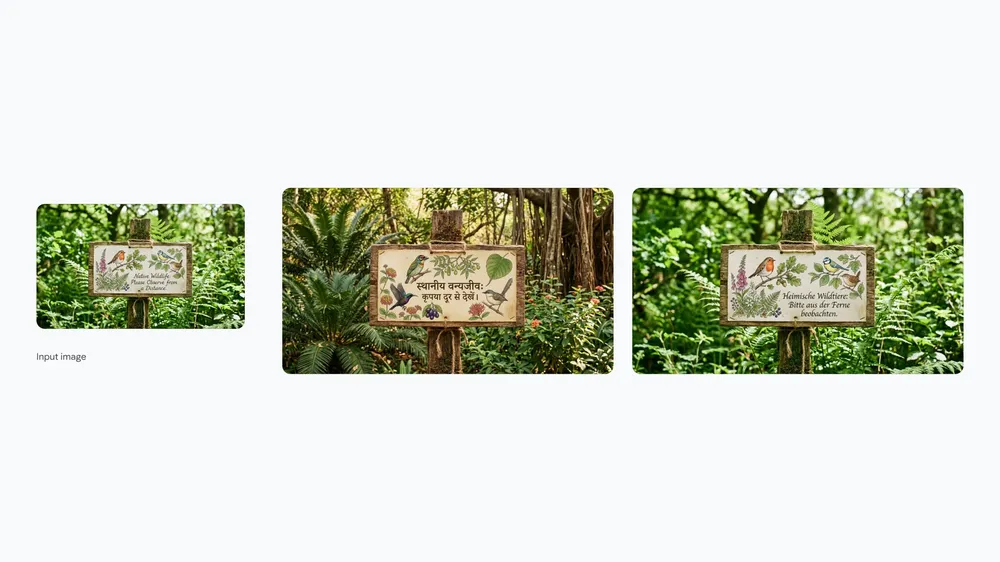
Official Nano Banana 2 sign rewritten from English into Hindi, with regional birds and plants

Translation inside the picture

Change the words and the visual context together. Google's pair of wildlife signs swaps both the language and the local species, rather than just replacing one line of text on an otherwise identical design.

Start with Nano Banana 2
Official Nano Banana 2 farmyard with fourteen characters and props kept consistent

Lots of consistent subjects

Fill a frame with many different characters and props, each keeping its defining traits. Google made the farm deliberately cluttered, so it says more about consistency than any single portrait could.

Start with Nano Banana 2
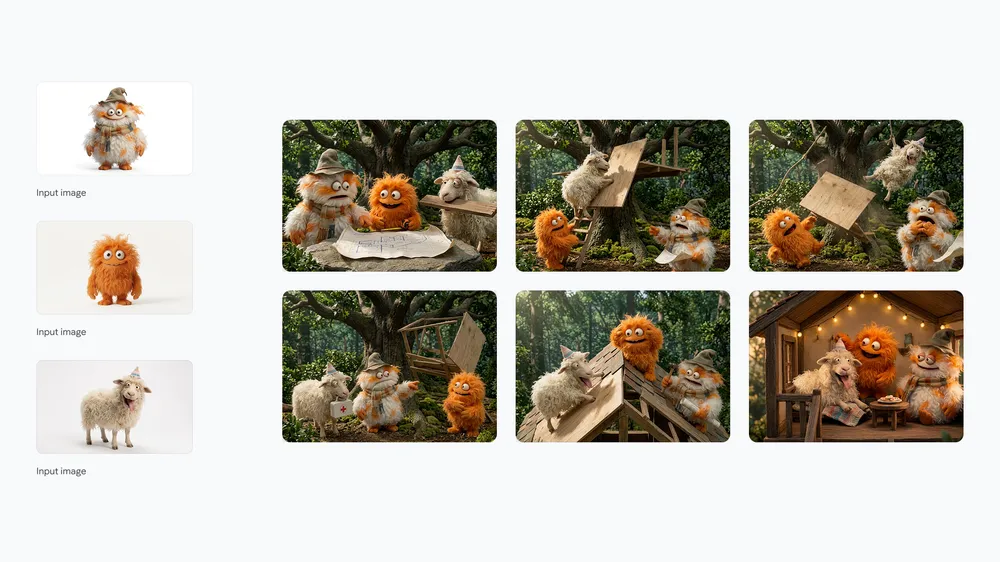
Official Nano Banana 2 panel story: three fluffy creatures put up a treehouse

Stories told in panels

Draw a run of frames with one cast, one activity and one location. In the treehouse panels the camera moves closer and further and the faces change, yet the three fluffy builders never stop looking like themselves.

Start with Nano Banana 2

Swap the outfit and the setting while keeping the same recognisable person

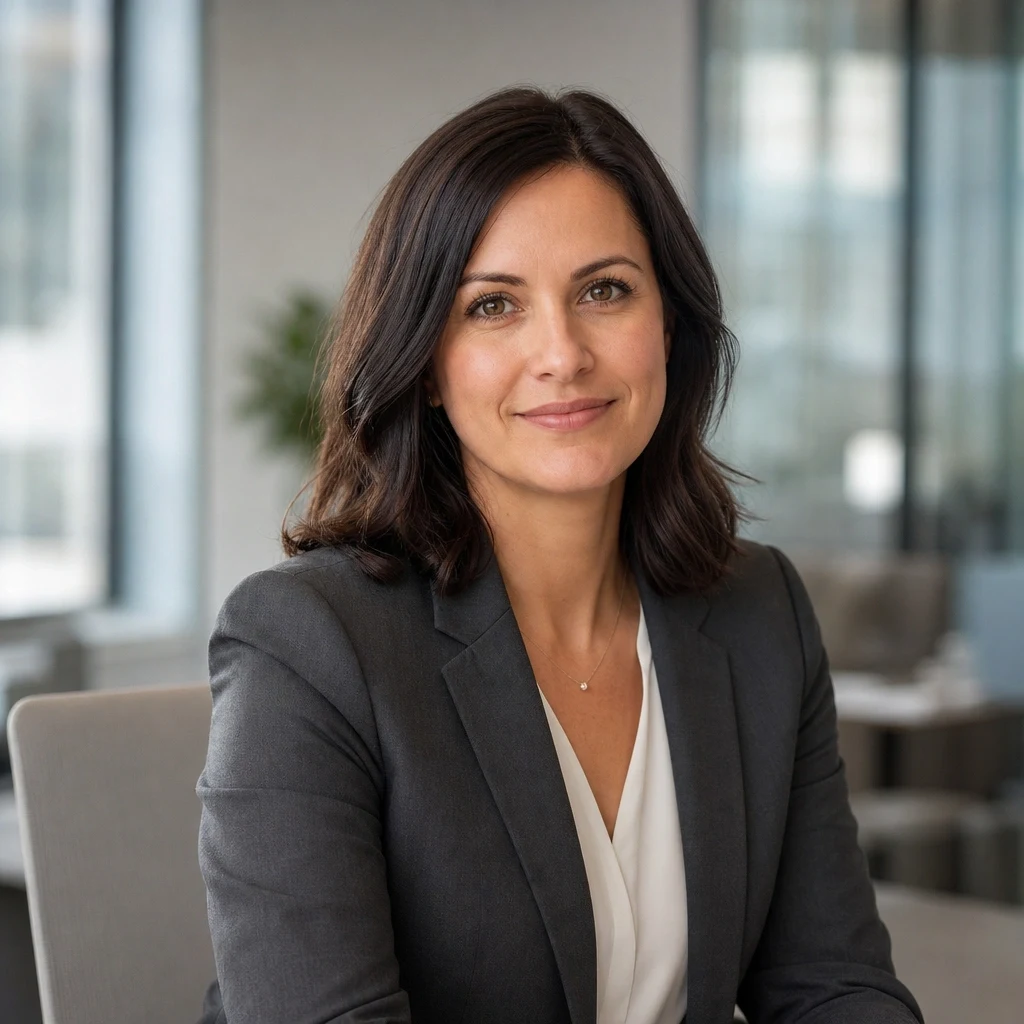
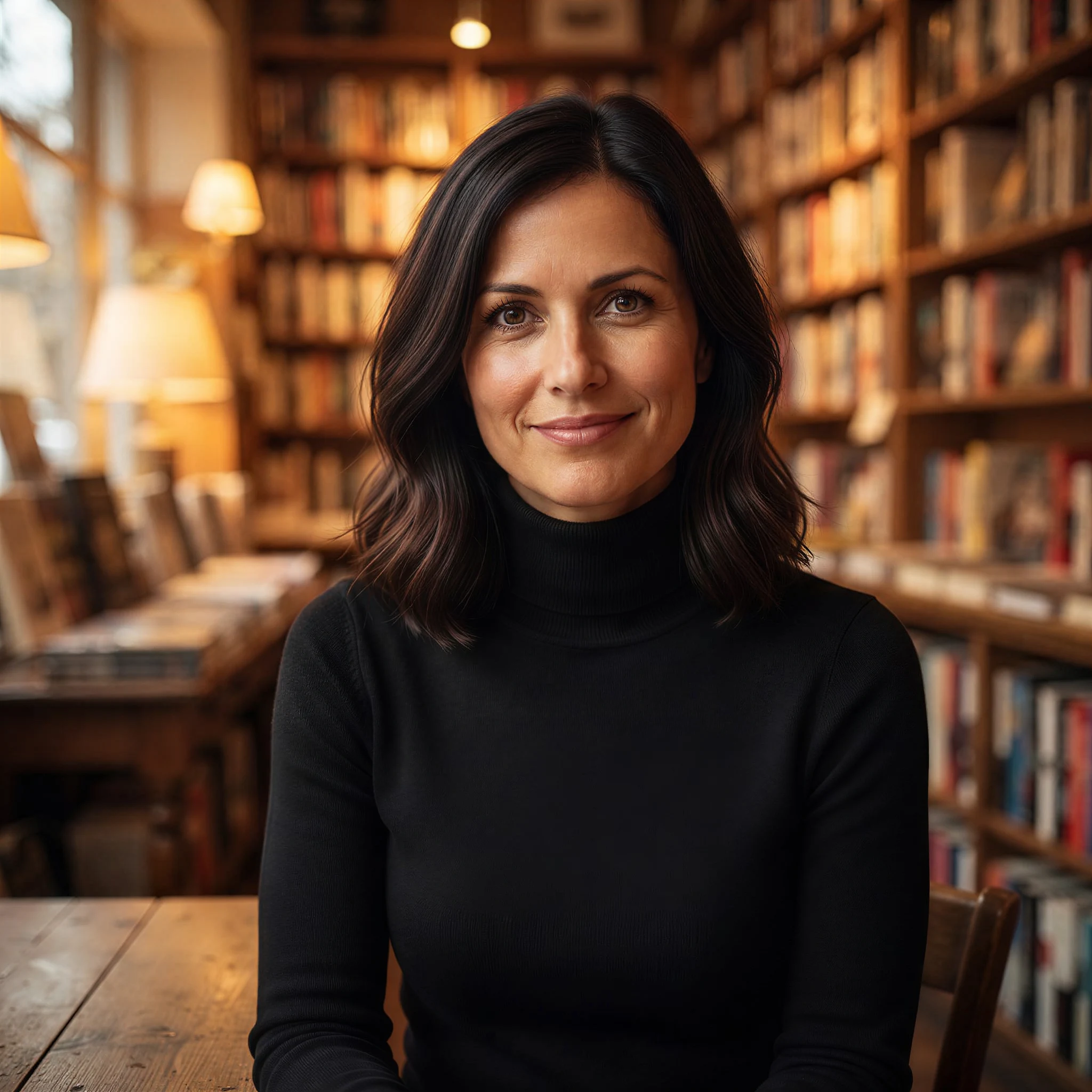
An edit is easier to judge when your prompt names everything that should survive it. In this one the outfit, the room and the lighting are new, while her face, hair, skin tone and expression carry over.

Office portrait used as the reference for a Nano Banana 2 outfit and location edit
Original office portrait
Nano Banana 2 result: the same woman, now wearing a black turtleneck in a cosy bookshop
Edited bookshop portrait

Change the blazer to a black turtleneck and move the woman into a warm bookstore. Keep her face, hairstyle, skin tone and expression the same. Use soft amber practical light and a centered editorial portrait composition.

Where Nano Banana 2 speeds up day-to-day work

Pick it when you want several strong options, consistent frames or high-resolution variants without paying premium-model prices for every test.

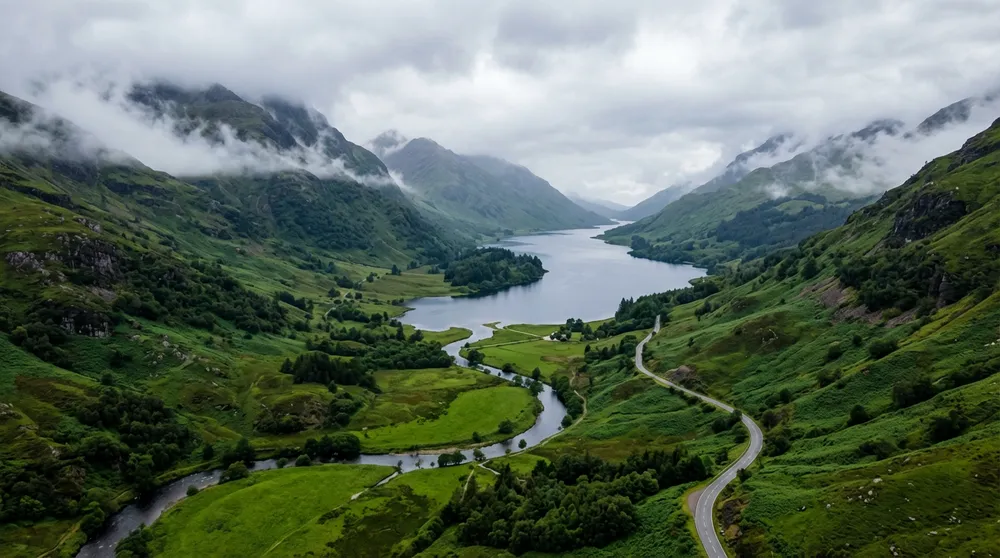
Official Nano Banana 2 drone view over a foggy valley, a curving road and a dark lake

Campaign backdrops and scene setters

Produce atmospheric scenery and location concepts for decks, key art and storyboards. Specify the vantage point, the weather, the palette and how much open space later headlines will need.

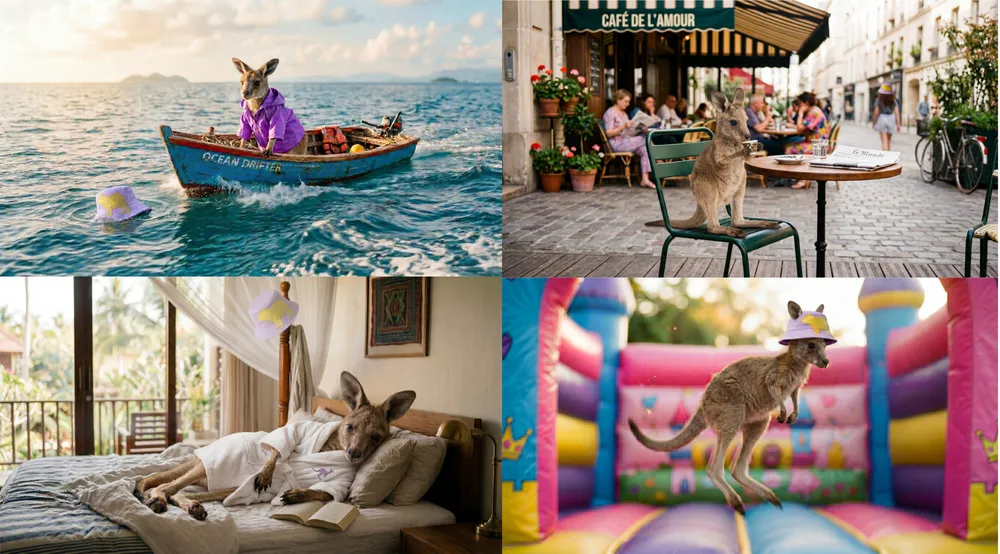
Official Nano Banana 2 four-frame holiday story starring a kangaroo

Character sequences and content series

Plan a string of connected scenes starring one subject who keeps doing new things. References lock down who the character is; your prompt says what is different in each frame.

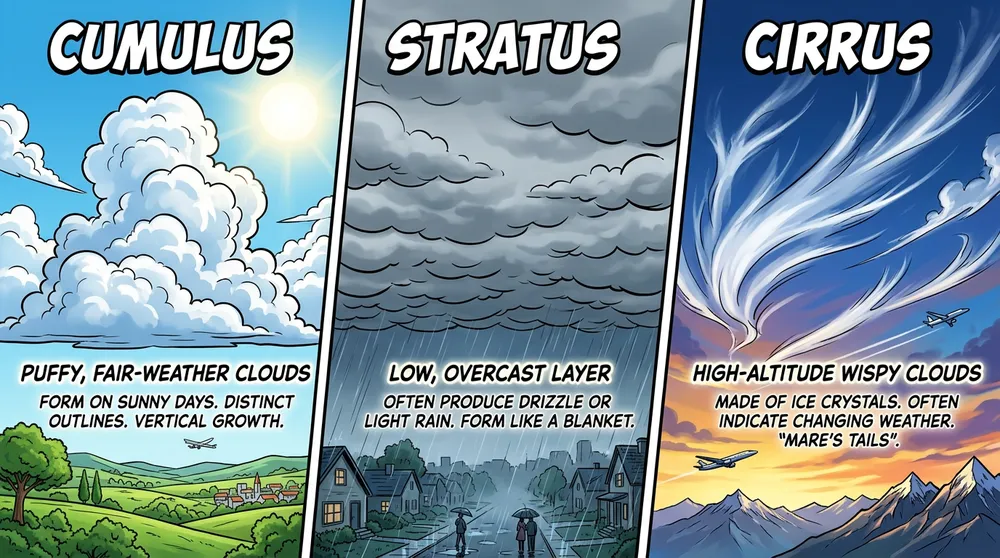
Official Nano Banana 2 comic infographic explaining three cloud types

Social explainers and teaching visuals

Make compact labelled graphics for classrooms, articles or social posts. Keep the information short enough to proofread and set the reading order in your prompt.

Prompting Nano Banana 2 for accurate first drafts, fast

Fast output is only valuable if the brief stays sharp. List the goal, supporting material, composition and constraints in the same order every time so rounds can be compared fairly.

Prompt template

What the asset is and where it appears + hero subject + job of each reference + action or edit + framing and camera + exact text + lighting and look + must-keep details and exclusions.

Sample prompt for a consistent three-panel series

Make a wide 16:9 triptych where the uploaded knitted fox plush stars in every panel. Left: it packs a tiny suitcase on a quilted bed. Middle: it waits at a rainy bus stop, shot from below. Right: it arrives on a sunny beach at golden hour. Keep the rust-orange yarn, the white chest patch and the frayed left ear. Cosy storybook realism, varied camera distance from panel to panel, an obvious left-to-right flow, no captions, nobody else in frame.

01

Change one thing per round

Hold the subject and purpose steady and vary a single element — lens, layout or palette. Quick outputs are only comparable when the prompt is not shifting every target at once.

02

Say what each reference is for

Say which upload sets the identity, the product's shape, the location or the look, and name the features to carry over instead of requesting vague consistency.

03

Quote exact text, keep sections short

Wrap required wording in quotation marks and break explainers into a handful of labelled parts. Check the output, then correct the text block by block.

Use Nano Banana 2 in three steps

Explore at the cheaper resolution, then carry the winning direction through untouched as you move up to a production-ready output.

01

Say where it is going

Name the actual deliverable, who will see it and its frame. Follow with subject, action, layout, wording and finish, all described concretely.

02

Add references, pick the output

Attach as many as five references when they fix an identity or design issue. Set the frame shape and choose 1K, 2K or 4K depending on the stage of the project.

03

Compare, check, refine

Look over continuity, text and anatomy, then run a targeted variation. Raise the resolution once the layout and creative direction are right.

Nano Banana 2 settings and lean pricing

This model has no separate quality menu on MuseGen. Resolution is the main lever for both output and cost.

SettingOptionsWhen to pick it
Resolution1K, 2K, 4K1K for quick exploration; 2K or 4K for sharper frames ready for production.
Aspect ratio1:1, 2:3, 3:2, 3:4, 4:3, 9:16, 16:9Decide on the final canvas up front so the subject, any wording and the breathing room are laid out for the right placement.
Reference inputOptional, 5 images maxBring in references to fix a person, item, location or look, and explain each one's role.
Credits2 at 1K, 3 at 2K/4KYou see the total before generating, and credits come back automatically if a job fails.

Pick Nano Banana 2 when you need to iterate

It balances quality, speed and price. Only move to a premium alternative when the brief clearly needs the extra control.

SituationNano Banana 2Look at another model
Quick visual explorationAn efficient model made for fast creation, quick edits and output in large batches.Nano Banana Pro is the better choice for the toughest compositions once a direction is settled.
Resolution for the moneyAt the moment 4K and 2K are both 3 credits, which keeps high-resolution experiments inexpensive.GPT Image 2 adds clear quality levels and transparent backgrounds when those outweigh straightforward pricing.
Consistent seriesA good match for character line-ups, panel stories and recurring subjects led by reference images.Reach for Nano Banana Pro if many people or precise brand elements need to survive a crowded composition.
Text and translationUseful for brief explainers, signage and styled copy across languages — every word still deserves a proofread.Seedream 5.0 Pro suits information-heavy layouts; Nano Banana Pro suits longer, high-end visual pieces.

Quick results still need a careful look

Speed helps you iterate, yet an image nobody has checked is still not a reliable final asset.

  • Google's Search and Image Search grounding options for this model are not available on MuseGen yet.
  • Verify any text, translations, charts, dates and claims of fact in the image before it goes live.
  • Zoom in to full size on faces, hands, identity, duplicated objects, reflections, shadows and tiny labels.
  • Consistency drifts when references disagree or when the prompt never explains why each one is there.
  • You get a single flattened image; for editable text, reusable parts and final print or web files, finish in a design app.

Nano Banana 2 FAQ

What exactly is Nano Banana 2?

It is Google's fast, efficient model for creating and editing images, officially named Gemini 3.1 Flash Image. The goal is strong quality with short waits at production volume.

How does Nano Banana 2 compare with Nano Banana Pro?

Nano Banana 2 is tuned for speed, value and everyday volume. Nano Banana Pro is tuned for the highest fidelity, intricate compositions, advanced localisation and fine control.

Can Nano Banana 2 edit a picture I upload?

Yes. Add a reference, explain the edit, and spell out which identity, objects, framing and lighting must stay as they are. Up to five images are accepted on MuseGen.

What resolutions can I choose?

1K, 2K and 4K are available on MuseGen. 1K costs 2 credits; 2K and 4K cost 3 apiece for now.

How well does Nano Banana 2 handle text in images?

Google says international text rendering has improved in this model. Keep wording brief, wrap the exact copy in quotes, and check every important label or translation yourself.

Will characters stay consistent across several frames?

Consistency across multiple references is one of its design goals. Sharp reference photos plus a written list of traits to keep make a sequence far more controllable.

Is Google Search grounding switched on here?

No. The underlying model supports grounding with Google Search, but on MuseGen you work with prompts and reference images only — there is no grounding toggle yet.

What is the reference image limit?

This workflow takes up to five images. Give each a clear purpose and drop any reference that does not add essential information.

When is 4K worth it?

Choose 4K when the layout already works and the placement rewards extra native detail. For now it is 3 credits, the same as 2K, though fine detail and small text still need a look.

Sources and where the examples come from

Capabilities and official sample images are taken from Google's Nano Banana 2 announcement and its current Gemini model documentation. The portrait edit credits its published before-and-after source.

Make your next idea a real image

Begin at 1K, compare a few targeted variants, then take the strongest prompt and references into a detailed 4K result.

Start with Nano Banana 2