

All-in-one video model by Alibaba

公式モデルガイド/オンラインジェネレーター

Wan 3.0 AI動画ジェネレーター

スライド、PDF、公開ウェブページ、または最大 20 件の参照を、ネイティブ音声つき 1080P の 30 秒ワンカットにまとめます。 下のWan 3.0 AI動画ジェネレーターで、プロンプト、画像、2枚のフレーム、対応する参照素材から制作できます。

Showcase clip from the Wan 3.0 AI video generator
Launch footage released by Alibaba for Wan 3.0, re-encoded for the web.

Wan 3.0でオンライン生成

MuseGenの完全版動画ワークスペースを統合し、初期モデルとしてWan 3.0を選択しています。他の設定を保ったまま、バリエーション比較やモデル変更も可能です。

Wan 3.0 AI動画ジェネレーターを読み込んでいます…

生成にはアカウントが必要で、モデル、バリエーション、長さ、解像度などの設定に応じてクレジットを使用します。失敗したタスクは自動返還されます。

Wan 3.0とは? どのような場面で使うべきですか?

Wan 3.0 is the all-in-one video model from Alibaba, in open beta since early August 2026 (the 6th) under the API name wan3.0-video. It was not built as a prompt-to-clip model with uploads added later: prompts, pictures, footage and audio can share one request with a document or a public web page, and the model sorts out how they connect. No other model on this site works that way — the rest start from a prompt and perhaps some media. Wan 3.0 can start from a file.

Longest single-take clip
30s

Longest single-take clip

Reference files per request
20

Reference files per request

Maximum resolution, 30 fps
1080P

Maximum resolution, 30 fps

Document pages it can read
50

Document pages it can read

Documents and webpages

Hand over slides, a PDF or a link

Wan 3.0 takes one document or one link with a prompt — or without one. Decks running to 50 pages and 100 MB work, as do PDF files, spreadsheets, Markdown and any page you can open without signing in. It studies the material and builds a film around it, rather than converting each slide into a matching shot: a deck with a clear argument beats one stuffed with presenter notes. The request format is laid out precisely in Alibaba's API documentation — a single attachment, a single prompt, adaptive framing and a set length — and the prompt below is a shortened copy of the documented example. The three clips come from Alibaba's published Wan 3.0 material rather than from that request. We show them because they probe what file input really needs: legible lettering, real layouts, and graphics that hold their form as the camera travels.

What file input relies on

App screens and interface cards
Maps, charts and type

“A premium smart-glasses product ad. Minimal, futuristic, restrained lighting; black, silver-grey and ice-blue, with soft white highlights and parameter UI graphics. The glasses emerge from darkness, the camera passes close over lens, nose pads, hinge and temples, then the product rotates in mid-air while the key specifications appear as minimal motion graphics.”

In practice

What thirty seconds at thirty frames per second really gives you

One take instead of four joined up

Half a minute comes out of one generation. The clip next to this text plays straight through — a break by the highway, someone pulling up, then the gag — and the lighting, colour and setting never drift. Getting the same from three short clips means lining them up by hand, and those joins are where the spell usually breaks.
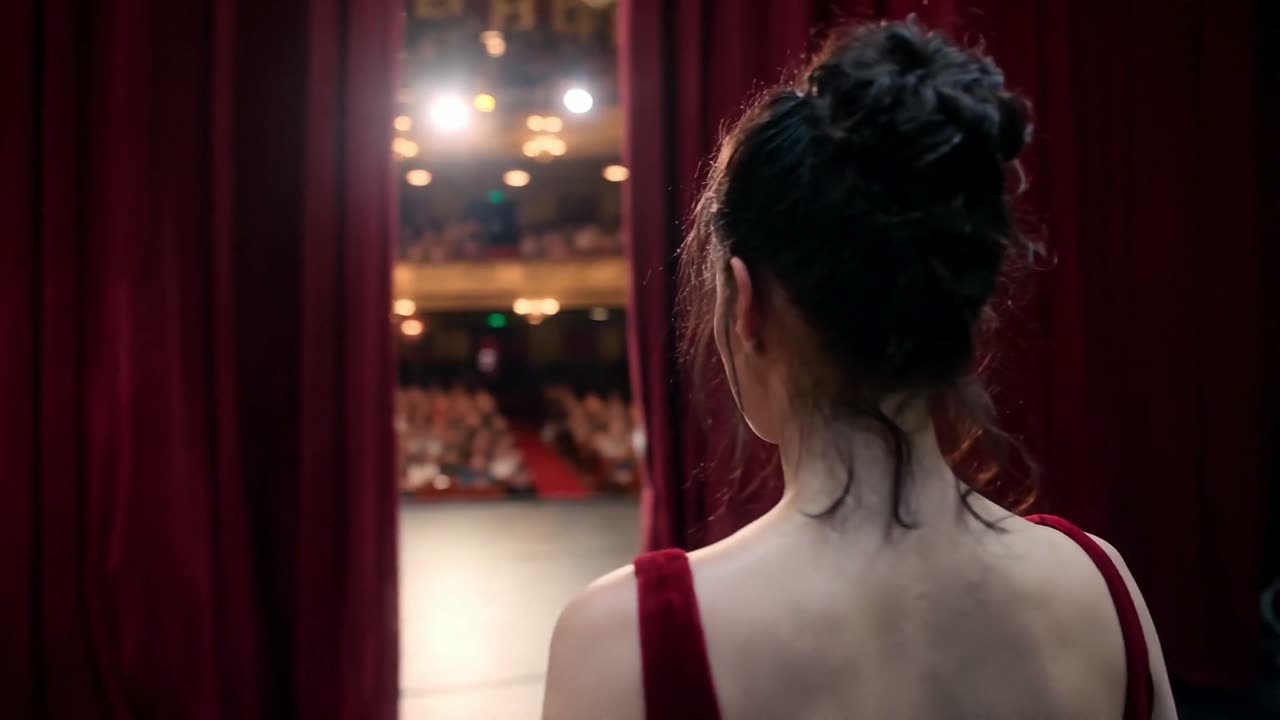
One face, every shot

Alibaba promises reference details reproduced down to the pixel, and that promise is what makes the model usable for client work. Across edits, shifting light and moving cameras, the outfit, the hairstyle and the face all have to stay identical — or every render becomes another round of casting.

Weight, texture and touch

Long shots reveal the physics. At thirty frames a second, contact — a thumb sinking into dough, flour puffing up and drifting down — gets enough samples to feel bound by gravity, which is exactly where shorter, lower-frame-rate clips tend to turn mushy.

Everything one request can hold

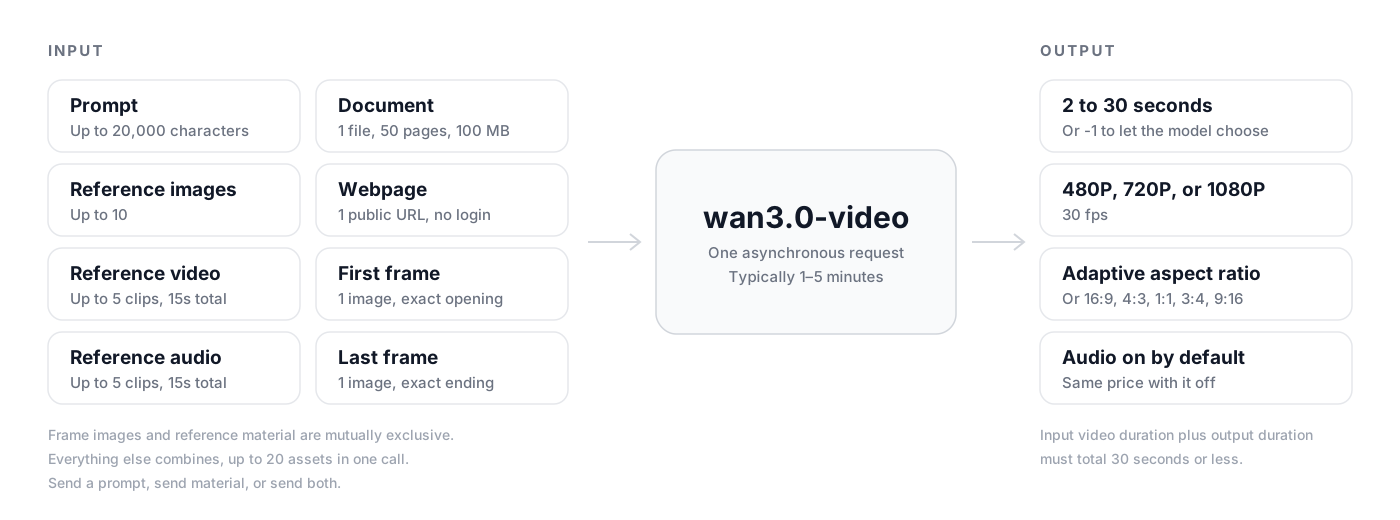
Alibaba has not described how Wan 3.0 is built, and its weights are private. It has documented the request contract, which is the more practical thing to learn before generating. Based on the Model Studio API reference, the diagram puts every possible input on the left and everything returned on the right.

Diagram of the Wan 3.0 request: a prompt, reference images, video, audio, one document or webpage, and first and last frame images going into wan3.0-video and returning a 2 to 30 second clip at up to 1080P and 30 fps with audio

Wan 3.0 vs HappyHorse 1.1

Both come from Alibaba and both are available on MuseGen. HappyHorse 1.1 remains the faster, cheaper option for a short clip built from an image. Reach for Wan 3.0 when the shot has to run long, use substantial reference material or start from a file.

FeatureHappyHorse 1.1Wan 3.0
ReleaseJune 2026August 2026
Longest clip15 seconds30 seconds
Frame rate24 fps30 fps
Resolution720p or 1080p480P, 720P or 1080P
Reference materialAs many as 9 images10 images, 5 video clips and 5 audio clips
Documents and webpagesNoOne file of up to 50 pages, or one public URL
Frame controlA single starting imageFirst frame, last frame or both
Length controlYou set the lengthYou set it, or the model chooses

Four jobs it already handles

Each clip below is Alibaba's own Wan 3.0 material, re-encoded for the web. The generator above offers the same modes.

Product films from your spec deck

Upload the launch slides you already have and Wan 3.0 will stage the product: slow passes over materials and finish, a turntable shot with the figures on screen, a tidy end card.

Retail and lookbook close-ups

Photos of the real garment or item keep their seams, texture and metal fittings intact across a 30-second cut — the detail that decides whether a shopping clip can be used at all.

Native vertical edits

Render 9:16 directly instead of cropping a widescreen master, and use the whole running time a feed will actually show rather than a five-second loop.

Stories led by a character

Provide a face as reference material and that person stays recognisable through edits, shifting light and moving cameras — enough to carry a whole scene, not a single moment.

生成を始める

Wan 3.0で動画を作成する方法

このモデルページを離れずに、アイデアから設定済みのWan 3.0生成へ進めます。

1

ショットを説明する

被写体、動作、環境、カメラ、スタイル、時間、音を記述します。参照素材がある場合はアップロードし、各素材の役割を説明します。

2

Wan 3.0を設定する

Wan 3.0を選択したまま、バリエーション、モード、長さ、アスペクト比、解像度、音声を設定し、表示されるクレジットを確認します。

3

生成・確認・再利用

タスクを開始し、結果パネルで進行状況を確認します。完成動画を確認し、設定を別テイクに再利用するか、ファイルをダウンロードします。

Wan 3.0 AI動画ジェネレーター よくある質問

What exactly is Wan 3.0?

It is Alibaba's all-in-one model for generating video, available in public beta since August 2026 and offered via Model Studio as wan3.0-video. It brings together prompt-to-clip, image animation with first and last frame control, and reference-driven generation, and it is the first Wan release to take documents and public web pages as input. The weights are not public.

Can Wan 3.0 make a video from a PowerPoint or a PDF?

Yes. Attach one file and Wan 3.0 reads it and generates a video from it. It reinterprets the material rather than copying it slide by slide, so slides and shots will not line up one to one — think of the deck as the brief, not the storyboard. You can send the file with no prompt, or add one to guide the tone, pacing and framing.

What file types and size limits apply?

DOCX, DOC, XLSX, XLS, PPTX, PPT, PDF, TXT, MD, plus Apple's Keynote, Pages and Numbers. One file per request, no larger than 100 MB or 50 pages. A file and a web link cannot travel together, and neither can be combined with first or last frame images.

Does Wan 3.0 understand webpages?

It takes one public URL per request — a news story, a blog article, a product page — provided the page needs no login. Pages behind sign-ins, paywalls or bot checks cannot be read.

What is the longest Wan 3.0 video?

Anywhere from 2 to 30 seconds, rendered as one continuous shot at 30 fps. You can also let the model set the length from your prompt and material. When you add reference video, the input length plus the output length must stay within 30 seconds.

How many references fit in one request?

A maximum of 10 reference images, 5 reference clips and 5 audio files — 20 references in one request. Each clip or audio file runs 1 to 15 seconds, and each type is capped at 15 seconds in total. Reference material and first or last frame images are separate modes and cannot be combined.

Can Wan 3.0 produce sound?

Yes, and it is switched on by default. You can turn it off for a silent master, but the render costs the same either way, so there is seldom a reason to.

What does Wan 3.0 cost on MuseGen?

Credits are charged per second of output and rise with resolution: 720P costs double 480P, and 1080P costs double 720P. Audio does not affect the price. The exact cost for your settings is shown in the generator before you begin, and failed tasks are refunded.

Is Wan 3.0 open source?

No. Some earlier Wan versions were opened up, but Wan 3.0 is a closed-weight model offered through Alibaba Cloud Model Studio. On MuseGen it runs via APIMart, so there is nothing to install and no GPU to rent.

Wan 3.0の公式情報源

このページのモデル機能とメディアは、開発元の公式製品ページ、発表、ドキュメントを基に調査しています。

Wan 3.0で次の動画を作成

上の完全版Wan 3.0 AI動画ジェネレーターを開き、プロンプトや参照素材を追加して、次のショットを完成動画に変えましょう。

生成を始めるすべてのモデルを見る