Camera direction, written out
Put “slow push-in”, “handheld follow” or “drone pull-back” straight into the prompt. The AI video generator builds the camera move into the scene itself instead of bolting it on afterwards.


Write a shot the way you would explain it to a camera operator and get finished video back. Set the subject, the action, the framing and the mood, and MuseGen renders the scene with motion and optional native audio.
You need an account to generate, and credits depend on the model, length and resolution you pick. Credits for failed tasks come back automatically.
Every clip here started life as a sentence. Read the prompt, look at the first frame it produced, then play the whole AI-generated video to see how the wording turned into movement.
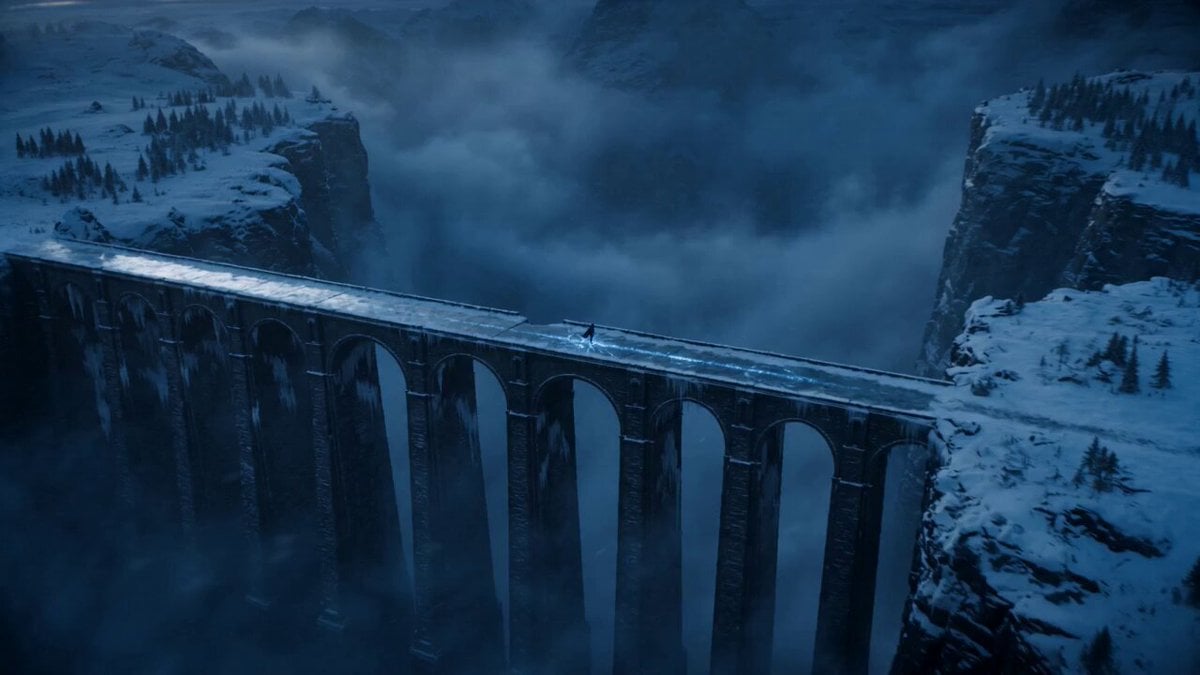 Opening frame
Duration: 15 seconds Style: Ultra-realistic cinematic, dark fantasy, hyper-realistic, 9:16 vertical, 8K, 60fps. 0–3s: A wide aerial shot reveals an ancient frozen stone bridge stretching over a bottomless icy canyon during blue hour. Snow falls steadily as blizzards sweep across distant mountains. Cracked ice glows with mysterious blue runes beneath the warrior's feet. Cinematic drone push-in. 3–7s: The camera slowly circles behind a mysterious hooded warrior standing motionless on the bridge. A tattered black cloak whips violently in the freezing wind. Ultra-detailed medieval armor glistens with frost while a glowing silver sword reflects the icy surroundings. Volumetric fog drifts through the canyon. 7–11s: A low-angle tracking shot moves toward the warrior as they slowly raise the enchanted sword. The blue runes pulse brighter across the frozen bridge, snow swirls dramatically around the cloak, and distant lightning briefly illuminates the storm clouds and snow-covered peaks. 11–15s: The warrior takes one powerful step forward. A shockwave of glowing blue energy races through the ancient runes beneath the ice, sending sparkling frost across the bridge. The camera rapidly pulls back into a breathtaking aerial view as the blizzard intensifies, ending on an epic cinematic wide shot with the lone warrior standing against the frozen wilderness.
One line is enough, or write out a full sequence. A text to video model reads the subject, location, movement, camera language, light and sound together and builds them into a single scene.
Compare the strongest text to video models side by side in one workspace. Draft cheaply on Seedance 2.0 Mini, then move to another model when a scene calls for more realism, quicker action, a longer runtime or native audio.
You keep every creative call in view; the AI fills in the frames that connect them.
Put “slow push-in”, “handheld follow” or “drone pull-back” straight into the prompt. The AI video generator builds the camera move into the scene itself instead of bolting it on afterwards.
You do not have to supply a clip or a starting picture. Explain the subject, its action and how the surroundings react, and the text to video model generates every frame from your words.
Get a widescreen cinematic shot, a vertical social clip or a square post from one idea. Choose the aspect ratio first so the composition is planned for the frame it will actually live in.
Models that support it add ambience, effects and speech next to the picture. With native audio, rainfall, footsteps and voices stay in step with what is on screen, no extra edit required.
Three steps take you from an empty prompt field to a clip you can download.
Say who or what is on screen, where it takes place and what the key action is. Only add camera notes, lighting or a style when they genuinely change the outcome.
Choose a text to video model, a length, a resolution and an aspect ratio. Run a short 480p version first to prove the idea before you put credits into a longer final cut.
Submit the task and track it in My Work. Watch the clip, try the same prompt on another model if it needs it, then save the finished AI video with no watermark.
Text to video earns its keep when the idea is clear but shooting it for real would be slow, costly or simply impossible.
Turn a campaign pitch into moving concept footage ahead of the shoot. Try out the setting, the camera move and the pacing, then hand the strongest version to the crew as a brief or post it as a social clip.
Produce hooks, ambient loops and mini stories for Reels, Shorts and TikTok. Open the prompt with one concrete action so the AI video has something to show in the very first second.
Write out a tricky camera move or stunt beat and watch it as footage before anyone is on set. Directors can weigh up several takes on a scene without paying for a location, actors or a VFX house.
Describe a painterly landscape, a stop-motion miniature or a graphic 3D sequence with no reference art. Repeat the same style words throughout the prompt and the clip stays visually consistent.
Generate storms, scenery, deep space and fantasy buildings no crew could reach. Mention scale, the hour of day and how the environment moves so the shot feels physically grounded.
Make an abstract point concrete in a short sequence for a deck, a landing page or a lesson. Build the clip around one clear metaphor rather than cramming several unrelated ideas together.
Look through real prompts next to the videos they produced. Choose one to load its wording into the generator, then change the subject, the action or the camera move to make it yours.
You see the credit cost before you generate, and it moves with the model, length and resolution. Prove a prompt with a short draft and only spend more on the take worth polishing.
A text to video AI generator produces a run of moving frames from a written description. Your prompt can set the subject, location, action, camera movement, light and look. Rather than working from filmed footage or an uploaded photo, the model builds the scene from scratch and works out how it changes from one moment to the next.
Yes. Opening the generator, browsing examples and drafting a prompt cost nothing. New accounts get starter credits that cover short renders. The exact cost is printed on the Generate button before anything runs, so you can adjust the model, length or resolution first.
No. Leave the image slot empty and the Create workspace sends a text-to-video task. Add a starting picture and the same workspace switches to image to video on its own. Both workflows live in one place, and you never have to pick a technical mode up front.
Start with a single subject and a single main action, then add the setting and one camera instruction. For example: “An old fisherman hauls a net onto a wooden boat at sunrise, spray in the air, low side-on tracking shot, warm natural light.” Concrete, visual directions work better than a string of moods. Add speech or sound only if the chosen model has native audio.
Seedance 2.0 Mini is selected by default because it is ideal for fast, inexpensive 480p drafts. Other models may suit you better for higher resolution, body movement, photorealism, longer clips or built-in sound. Running one prompt across several models usually tells you more than hunting for a single overall winner.
It depends on the model. MuseGen's models range from short social clips to longer multi-second scenes, and each one's limits appear in the duration control. Stay at four or five seconds while you shape the action. Once the movement and framing are right, lengthen the final prompt or switch to a model that runs longer.
Yes, if the model you pick supports native audio. The generator can ask for ambience, effects and dialogue alongside the picture, which keeps on-screen actions in sync with what you hear. Models without audio return a silent clip, and you can turn audio off when you plan to add music or voice-over later.
Yes. Pick 9:16 for Shorts, Reels and TikTok, 16:9 for widescreen, or any other ratio the model offers. Choosing the ratio before you render matters: the model arranges people, objects and camera motion for that frame, rather than you trimming a wide shot down afterwards.
No. Clips download with no MuseGen watermark. The inspiration examples on this page are checked before they are shown, so what you see here matches the clean output the generator gives you.
A video model has to juggle every instruction across every frame, so clashing actions or styles dilute the result. Cut the prompt down to one clear event, say what has to stay constant, and keep to a single camera move. If a draft misses, change one specific instruction instead of stacking on more adjectives.
It varies with the model, length, resolution and how busy the provider is. Short drafts usually come back faster than long high-resolution clips. You can close the generator: submitted tasks keep running and show up in My Work and your generation history once they finish.
That depends on your plan and the current terms of service. You are also responsible for any names, characters, brands or other material your prompt asks for. Sticking to original subjects and ideas is the easiest way to keep a text-generated video safe to publish.
Write a single scene, render a short draft and watch how it moves. Begin on Seedance 2.0 Mini at 480p, then scale up the prompt once the direction feels right.
Turn Text Into Video